

Finding the best WordPress data table plugin used to be a simple matter of comparing row limits and CSS styling. In 2026, the landscape has shifted. While speed and responsiveness remain the baseline, the integration of AI and real-time data syncing has redefined what a “table” actually does for your site.
Whether you are managing a massive product catalog, a sports league database, or a simple price comparison, your table shouldn’t just sit there—it should work for you.
1. Why the Right Table Plugin Matters in 2026
In an era of Core Web Vitals and “instant-answer” search results, a poorly coded table is a bounce-rate magnet. The best WordPress data table plugin must balance three critical pillars:
-
Mobile Responsiveness: Tables must collapse elegantly into cards or scrollable containers.
-
Data Integrity: Seamless imports from Google Sheets, Excel, or SQL databases.
-
User Interaction: Features like multi-column filtering and front-end editing are no longer “premium” extras—they are expectations.
2. Top 4 Best WordPress Data Table Plugins Compared
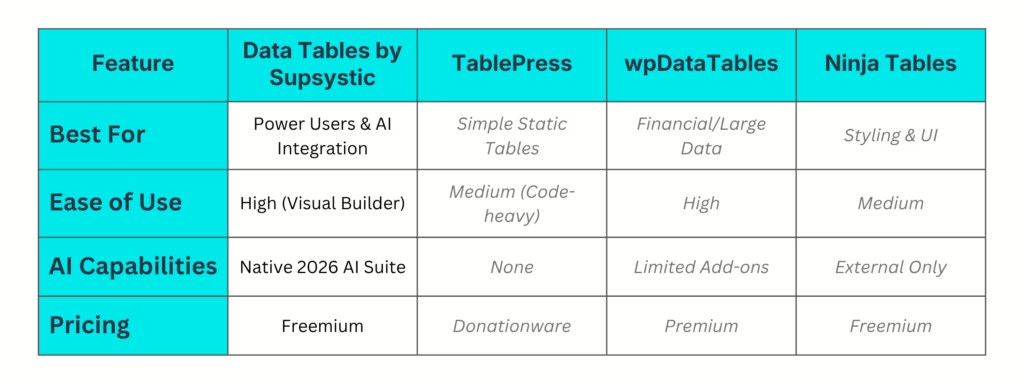
3. Deep Dive: Data Tables by Supsystic
If you are looking for the best WordPress data table plugin that handles everything from basic lists to complex, logic-based databases, Supsystic remains the industry gold standard.
Key Features:
-
Visual Table Builder: No more wrestling with HTML. Drag, drop, and style your cells in a familiar spreadsheet interface.
-
Automatic Syncing: Connect your table to a Google Sheet. When you update the sheet, your website refreshes in seconds.
-
Advanced Charts: Instantly convert table data into interactive diagrams and graphs.
-
SEO Optimized: Supsystic ensures your data is readable by search engine crawlers, helping your tables rank in “featured snippets.”

4. What’s Changed in 2026: AI Data Tables
The biggest differentiator this year is intelligence. Static data is dead. The modern best WordPress data table plugin now uses AI to categorize data, summarize long rows, and even predict trends based on your input.
Why AI is the Game Changer:
-
Automated Categorization: AI can scan your rows and assign tags or categories automatically.
-
Natural Language Query: Users can ask your table a question (e.g., “Show me products under $50”) rather than using manual filters.
-
Data Cleaning: The AI identifies duplicate entries or formatting errors before they go live.
5. Performance & SEO Impact
Using the best WordPress data table plugin isn’t just about looks; it’s about site speed. Heavy plugins bloat your JavaScript files. In 2026, Google rewards sites that use “lazy loading” for large datasets.
-
Server-Side Processing: This is crucial for tables with more than 1,000 rows. It ensures your page loads instantly while the data is fetched in the background.
-
Schema Markup: High-quality plugins automatically add
<table>schema, signaling to Google exactly what your data represents.
For more on technical SEO, check out the Google Search Central Documentation regarding structured data.

6. Final Verdict: Which One Should You Choose?
Selecting the best WordPress data table plugin depends on your specific project:
-
Choose Supsystic if you want a future-proof solution with AI capabilities, advanced filtering, and a visual interface that requires zero coding.
-
Choose TablePress if you have a very small site and don’t mind a more “classic” WordPress feel.
-
Choose wpDataTables if you are specifically working with complex SQL queries and MySQL databases.
Ready to transform your data? Download Data Tables by Supsystic here and start building your first interactive table today.

Frequently Asked Questions
1. Why is Supsystic considered the best WordPress data table plugin for AI integration?
In 2026, Supsystic leads the market by allowing users to manage data using natural language prompts. By integrating with the Model Context Protocol (MCP), you can simply tell your table to “calculate the average price” or “reformat the dates,” eliminating manual entry. This seamless AI bridge makes it the best WordPress data table plugin for users looking to future-proof their workflow.
2. Can I sync live data using the best WordPress data table plugin?
Yes. Supsystic allows for real-time synchronization with Google Sheets and Excel. When you update your external source, your website refreshes in seconds. This automated syncing capability is a standard feature for any tool claiming to be the best WordPress data table plugin in the current tech landscape.
3. Does the best WordPress data table plugin support mobile responsiveness?
Absolutely. Tables created with Supsystic are fully responsive by default. They utilize “Automatic Column Hiding” or “Horizontal Scroll” modes to ensure data looks perfect on smartphones and tablets. Ensuring a great mobile UX is a primary reason why it remains the best WordPress data table plugin for high-traffic sites.
4. How does the best WordPress data table plugin handle massive datasets?
For tables with thousands of rows, Supsystic utilizes Server-Side Processing. Instead of loading all data at once and slowing down your page, the plugin only fetches the rows being viewed. This performance-first approach is essential for any best WordPress data table plugin to maintain high Core Web Vitals scores.
5. Is the best WordPress data table plugin optimized for SEO and Schema?
Yes, Supsystic automatically generates the necessary <table> Schema markup. This helps Google understand your data hierarchy, often resulting in your table being pulled into “Featured Snippets” or “Rich Results” on the search results page. This built-in SEO advantage is a hallmark of the best WordPress data table plugin.