Customer Engagement System by Supsystic

WordPress Email Marketing & Automation Plugin

Your list goes cold while you copy contacts between tools. Here a popup, a form or an order tags the contact and the right chain starts on its own — welcome, follow-up, win-back — sent through your SMTP, with every open, click and sale tracked back to the email. No per-subscriber bill, no Zapier, no exports.
Try the free version in your browserno install, no account
11,000+Active installs
4.5/5300+ reviews
$0Per subscriber, any list size
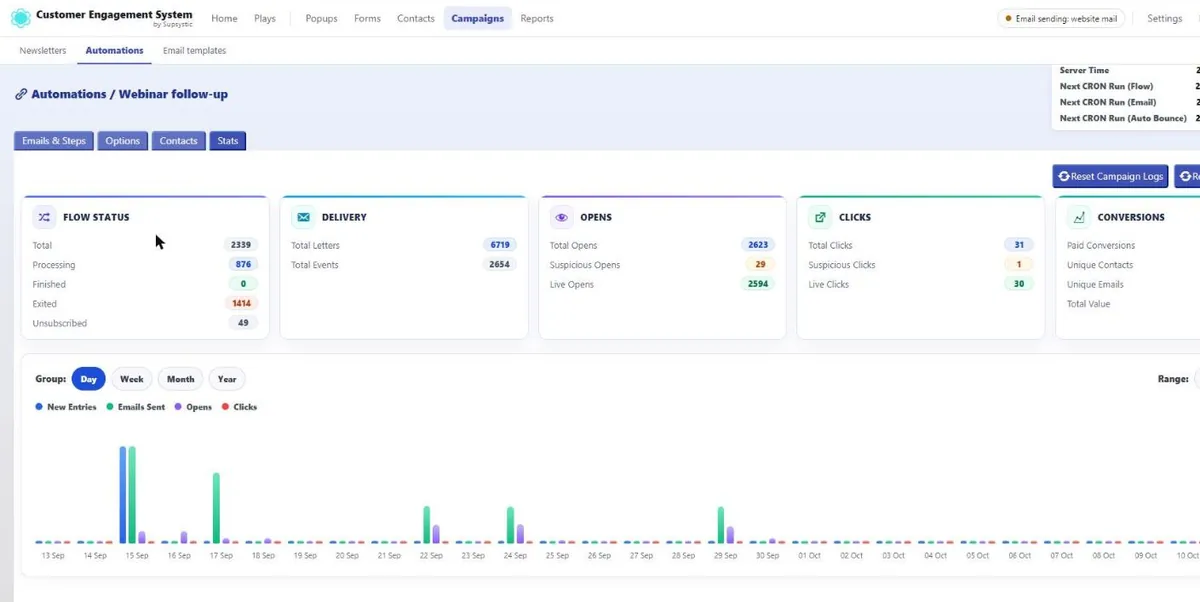
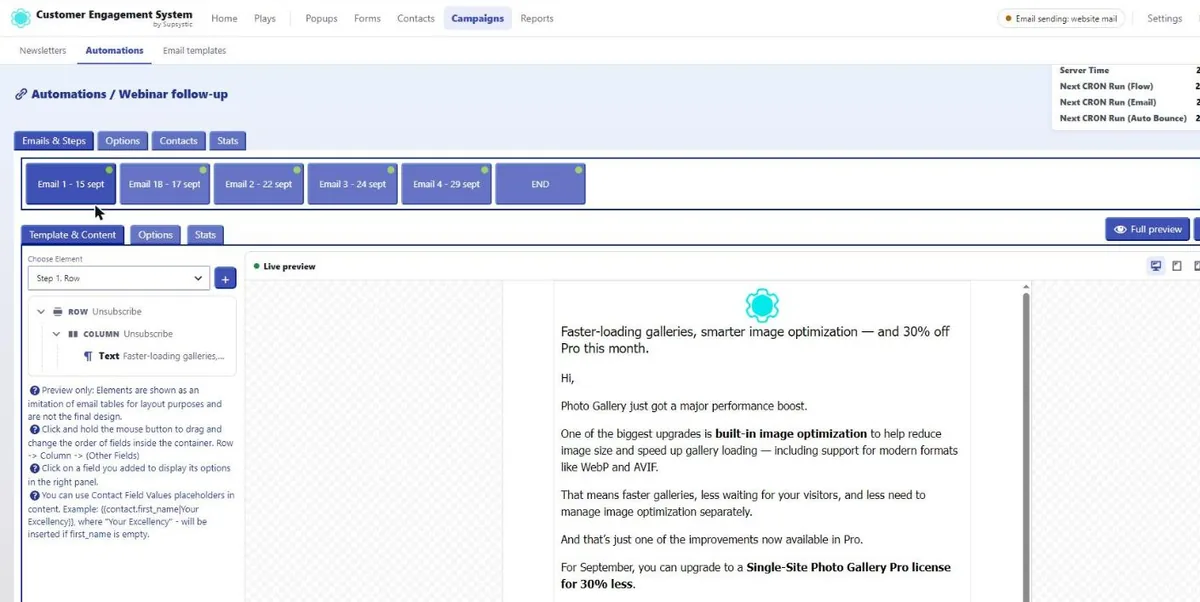
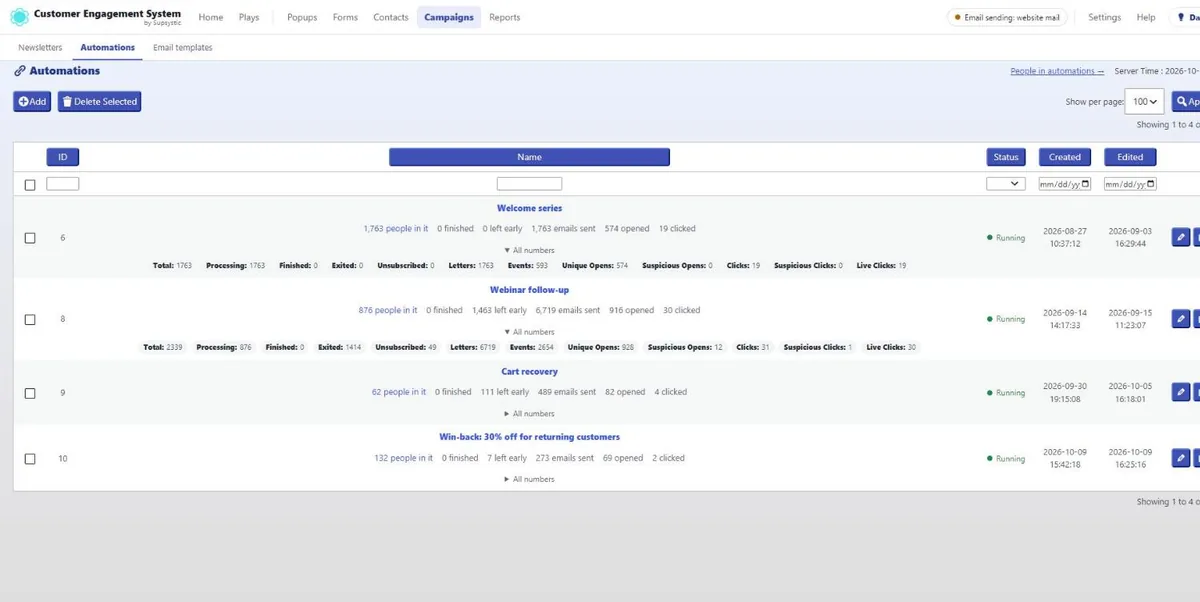
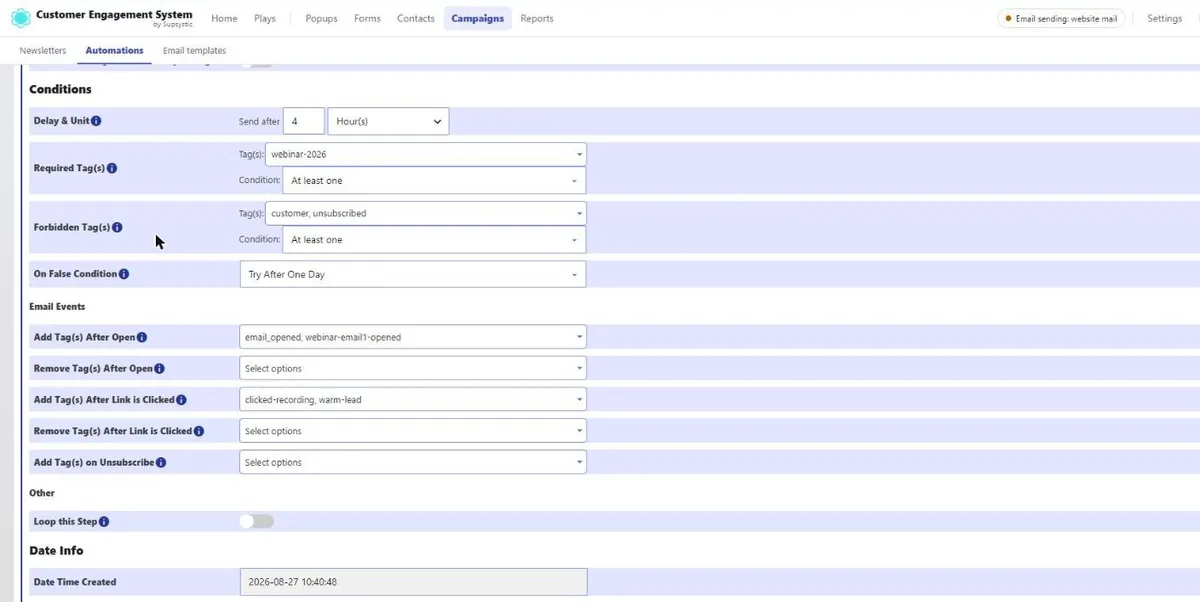
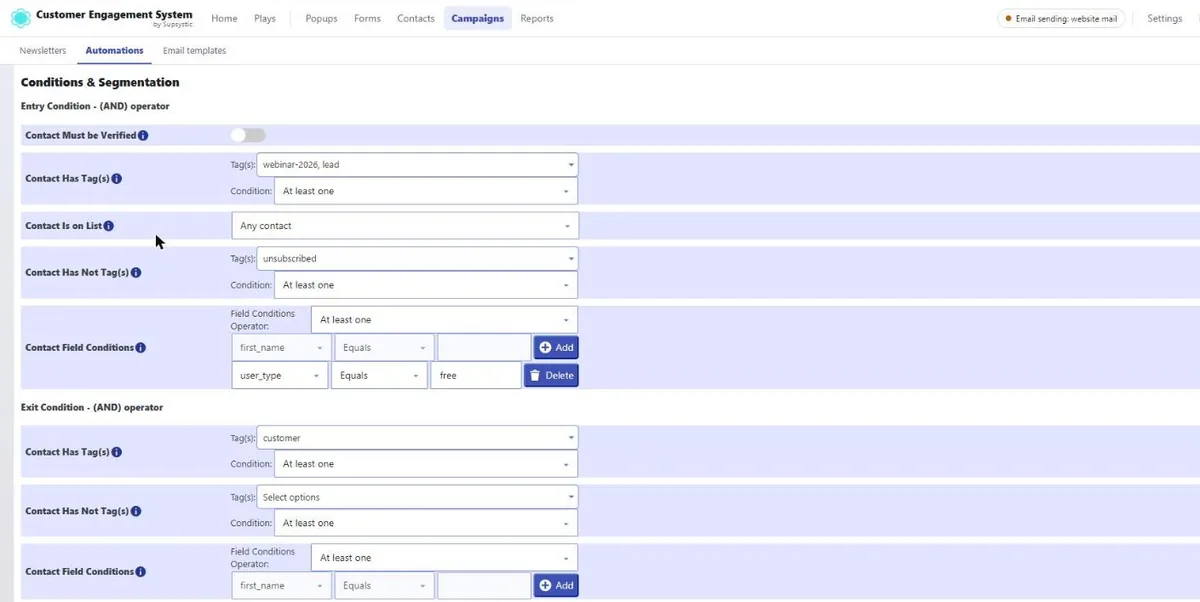
CES automation stats: flow status, delivery, opens, clicks and conversions per chainThe CES email step editor: element tree on the left, live preview on the rightThe CES automations list with people in each chain, emails sent, opens and clicksCES step conditions: delay, required and forbidden tags, tag actions on open and clickCES campaign entry and exit conditions with tags, lists and field rules
Welcome, follow-up & win-back chainsTag-triggered automationsVisual email editorSubject-line variantsOpens, clicks & revenue trackedNo per-subscriber fees
Customer Engagement System — one plugin, four modules, one contact base. You are looking at: Email Campaigns & Automations
Inside Email Campaigns

Every Email Knows Who It Is For and What It Earned

Real screens from the plugin: the automations, the step editor, the logic behind every step and the numbers each chain brings back.
Starts on its ownA tag from a popup, form, order or import starts the right chain — no manual sends.
Logic on every stepDelays, required and forbidden tags, retries and tag actions on open, click or unsubscribe.
Your brand, every emailA visual editor, shared templates and placeholders like the first name.
Revenue tracked to the emailOpens, clicks and sales credited to the step that earned them.
No per-subscriber feesSend through your SMTP or a provider — 500 or 50,000 contacts cost the same.
Automations at a glanceEvery chain with the people in it, emails sent, opens and clicks — open any row for all the numbers.
Write emails visuallyRows, columns, text, images and buttons with a live preview — plus placeholders like {{contact.first_name}}.
Logic on every stepDelay, required and forbidden tags, what to do when a condition fails, and tags added on open, click or unsubscribe.
Entry and exit rulesWho joins the chain and who leaves it: tags, lists, verified contacts and field conditions.
Analytics per automationFlow status, delivery, opens, clicks and conversions with a day-by-day chart.
Your brand templateHeader, footer and unsubscribe once — every email drops its content into the same branded layout.
Every open and clickA live log per contact, campaign and step — with the exact link and device.
The overviewEnquiries, new contacts, opened emails and conversion for the last seven days, on one screen.

Email tools charge per contact and know nothing about your site. The CES Email module sends from WordPress, uses the tags your popups, forms and WooCommerce orders already set, and reports opens, clicks, bounces and revenue on the contact record.

Why CES Email

Automations Driven by What Happens on Your Site

A tag is the trigger. Forms, popups, imports, orders and other automations all set tags — so any of them can start a sequence.

Step-by-Step Chains

Emails, delays, allowed sending hours, tag actions and (Pro) conditions, arranged as a chain. Chains start other chains through tags.

Campaigns & Templates

One-off sends to any tag or field segment, built from reusable templates with contact fields merged in and WooCommerce product blocks.

Your Delivery Stack

PHP mail or SMTP with IMAP bounce processing in Free. Pro: Microsoft 365, Google Workspace, Zoho, Fastmail, SendGrid, Mailgun, Brevo, Postmark, SMTP2GO, Resend, Amazon SES.

Opens, Clicks & Revenue

Opens, clicks and unsubscribes per email and per contact with tag actions on each event — and a 180-day Conversion Tracking token that credits the sale to the email.
One module, three kinds of sending

Automations, Campaigns
and Transactional Replies.

The editor asks one question first: is this a sequence that runs on its own, a one-off send, or the reply a form sends? All three use the same templates and the same providers.
Free & Pro

Automation

A chain started by a tag: welcome series, webinar follow-up, post-purchase, win-back.

  • Delays in minutes, hours, days; allowed sending hours
  • Tag actions on open, click, unsubscribe
  • Conditions and unlimited steps in Pro
Free & Pro

Campaign

A one-off send to a segment: newsletter, launch, sale.

  • Segment by tags and fields
  • Template with product blocks
  • Opens, clicks, bounces per campaign
Free & Pro

Form Auto-Reply & Notification

The email a form sends to the submitter and to you, from the same templates.

  • Contact fields merged in
  • Sent through the same provider
  • Start of the automation in one step
See what Pro adds to each kind Every kind is included with Pro — no separate purchase.
How It Works

From Mail Settings to First Automation in Four Steps

Most sites send their first automated welcome email within fifteen minutes of installing.

01

Connect Mail

PHP mail, or your SMTP plus IMAP for bounces and replies. In Pro, pick a provider and paste the key.
02

Make a Template

Logo, colours, text with contact fields merged in, a WooCommerce product block if you sell.
03

Build the Chain

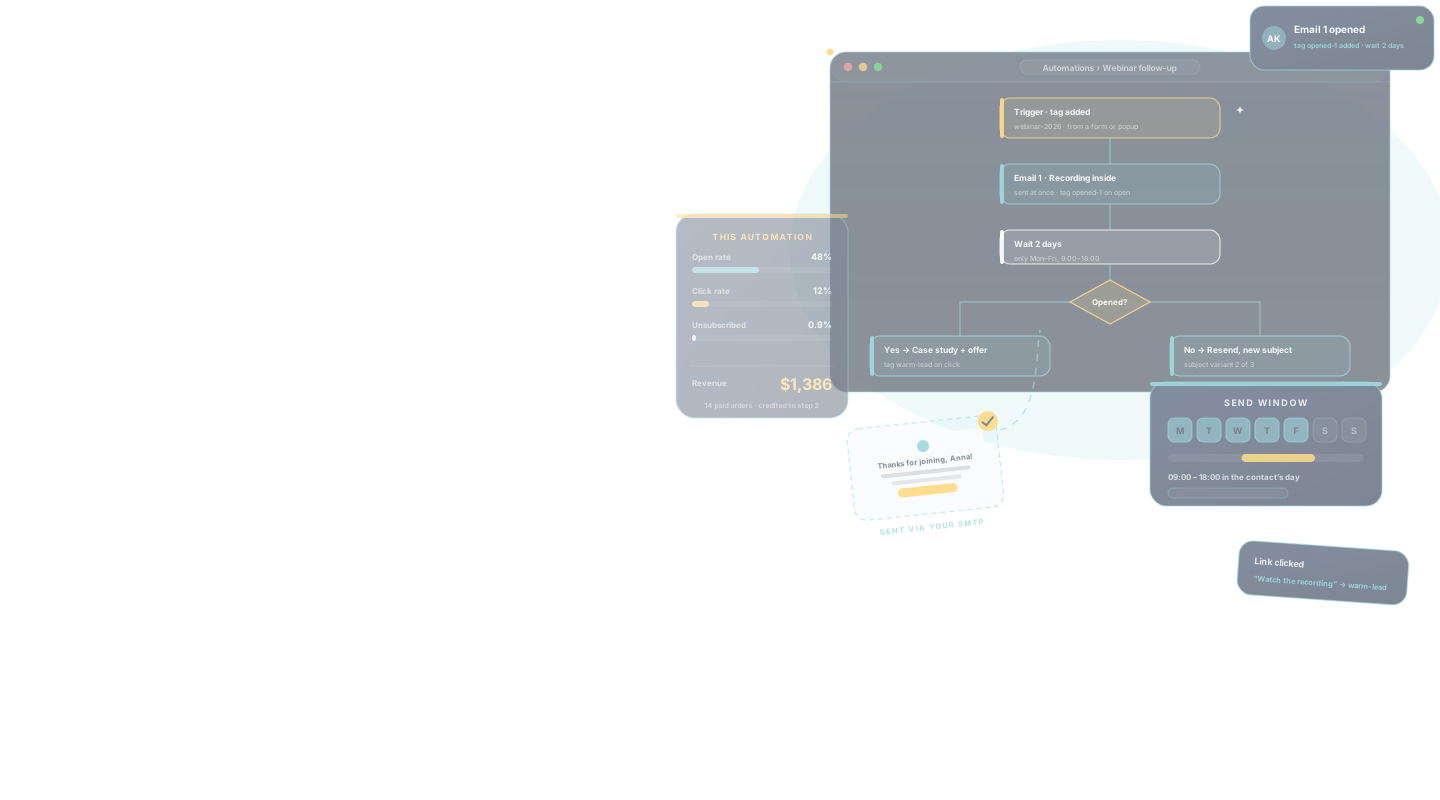
Trigger tag → email → wait 2 days → email → add tag. Add a condition in Pro.
04

Point a Form at It

Set the form (or popup, or import) to add the trigger tag on submit. Every new contact now gets the sequence.
Who It's For

Simple Enough for a Welcome Email. Deep Enough for a Store.

Whether you send one newsletter a month or run post-purchase and win-back chains on order data, it is the same module.

CES Email works especially well for:

WooCommerce Stores

Post-purchase series, review requests, win-back after 60 days without an order, VIP offers by total spent — on contacts imported from orders.
Most Common

Newsletters & Publishers

Campaigns to tag segments, a welcome series that sends itself, unsubscribes handled.

B2B & Service Businesses

Lead nurturing chains started by quote forms, replies threaded on the contact via IMAP.

Courses & Memberships

Onboarding drips after signup, re-engagement for inactive members by role tag.

Agencies

Client-owned email marketing inside the client’s WordPress, with a provider of the client’s choice.
Start with one welcome email. Add branches when the data says where.
Connected to popups, forms, CRM and WooCommerce

Email That Reacts to Your Site

Because the Email module shares a contact base with the rest of CES, an automation can start from a popup submit, branch on an order and stop when a reply arrives — without an integration layer.
Free

Tags in, emails out

Any form, popup, import or order can set the tag that starts a chain; any email can set the tag that starts the next one.

About the CES CRM
Pro

Conditions and unlimited steps

Branch on opened, clicked, has tag or field value; chains as long as the journey needs.

From $99 per year, all four modules
CES · automation · Webinar follow-up
Form › Registration submitted → tag webinar-2026
✓ Chain started for [email protected] · step 1 “Welcome + recording” sent via Postmark
Contact › Opens step 1 after 3 h
✓ Tag opened-1 added · wait 2 days
Condition › opened-1 present → branch A
✓ Step 2 “Case study + offer” sent · click → tag warm-lead
WooCommerce › Order #5521 paid $310 — token matched (12 days after click)
✓ Conversion attributed to step 2 · chain complete · tag customer → “Onboarding” chain starts
 
For Developers

Developer-Friendly by Design

Built to work cleanly inside real WordPress projects. Developers get:
SMTP, IMAP and 10+ provider integrations (Pro)
WP-Cron queue processed every minute, allowed-hours window
Conversion Tracking API with a 180-day browser token
Internal API to tag contacts and start chains
Hooks on send, open, click, bounce
Gmail tracking opt-out and deliverability settings
Templates with merge fields and product blocks
Unsubscribe and bounce handling built in
Chains can start other chains by tag
It integrates with your stack — it doesn’t replace it.
Capabilities

Build a Chain Once. Every New Contact Gets It.

An automation is written once and runs for every contact that earns the trigger tag — from a form today, an import next week, a WooCommerce order next month. Edit the chain and future runs update.
The Complete Solution

Built for Follow-Up.
Not Just Broadcasts.

Newsletter plugins send. This module remembers who opened, branches on it, credits the sale and hands the contact to the next chain.
The Professional Edge
A follow-up that arrives two days after the right event is read. A broadcast to everyone is deleted.
01

Chains With Delays, Hours and Conditions

Steps with delays in minutes, hours or days, an allowed-hours window per campaign, conditions on opens, clicks, tags and fields (Pro), tag actions at any step. Free: up to 4 steps; Pro: unlimited.
Automation
02

10+ Providers + SMTP

PHP mail and SMTP with IMAP bounce processing in Free. Pro adds Microsoft 365, Google Workspace, Zoho, Fastmail, SendGrid, Mailgun, Brevo, Postmark, SMTP2GO, Resend and Amazon SES.
Deliverability
03

Tracking With Tag Actions

Opens, clicks and unsubscribes tracked per email; each event can add tags that drive the next step or chain.
Engagement
04

Revenue Per Email

The Conversion Tracking API links WooCommerce purchases to the email or popup that started them, up to 180 days later.
Attribution
05

Replies Where You Need Them

IMAP brings replies onto the contact as a chat; bounces from the same mailbox clean the list.
Conversation
Start with a three-step welcome chain. The same setup still holds when it is twenty chains feeding each other across a store.
Stop Paying Per Contact

Automated Email. Total Control.

An email SaaS meters your list and lives outside your site. Here is what changes when email is one module of a plugin on your own WordPress.

Email marketing with a SaaS tool compared with the CES Email module
Task
Email SaaS
The metered way
CES Way
CES Email
The owned way
💰Cost at 10,000 contactsA monthly tier that rises with the list$0 in Free; one Pro license for providers and conditions
⚡Starting an automationSync the form to the tool, map the tag, hope the webhook firesThe form adds the tag; the chain starts
🛒Using order dataA paid e-commerce integrationWooCommerce orders, total spent and AOV already on the contact
📈Knowing what earned moneyLast-click in the SaaS dashboard, if integratedConversion Tracking API on the contact, 180-day window
🔒Where the list livesVendor cloudYour WordPress database; export any time
🔧DeliveryThe vendor's shared IPsYour SMTP or the provider you choose (10+ in Pro)
✕ Metered and externalGet CES Email Pro →
Alternatives

CES Email vs FluentCRM, MailPoet and Mailchimp

The email tools WordPress users compare most often, on the questions that decide a purchase. Single-site annual prices as published by the vendors.
CES Email compared with FluentCRM, MailPoet and Mailchimp on price, automations, providers and scope
FeatureCESCRM, Popup, Forms, Emails & AutomationsFluentCRMMailPoetMailchimp
Single-site Pro price$99 / year$129 / yearFree to 500 subscribers, then priced by list sizeFrom $13 / month at 500 contacts
Lifetime licensefrom $749 (up to 5 sites)
Free contactsUnlimitedUnlimited500 subscribers500 contacts
Multi-step automationsFree (4 steps), Pro unlimitedPaidPaid
Conditions / branchingProLimitedPaid
Send through your own SMTP
Provider integrations10+ in ProSeveralMailPoet Sending Servicen/a
Popups and forms from the same pluginSeparate pluginBasic formsBasic
WooCommerce orders on the contactProYesIntegration
Revenue attribution window180 daysYesLimitedYes
Prices and feature availability as published on the vendors’ own sites, checked 17 September 2026. Plans and limits change; check the vendor before deciding.
Risk-Free Purchase

100% Risk-Free Guarantee

Not sure if it's the right fit?
Try Pro for 30 days. If it doesn't do what you bought it for, write to support and get every cent back.
30-DayMoney-Back Guarantee
Visa · Mastercard · PayPal · Stripe

Every CES Pro license comes with a 30-day money-back guarantee. Not satisfied within the first month — for any reason — contact support and we refund the purchase. No forms to fill in, no questions to answer.

Pro Features

Where Pro Takes Over

The free version sends campaigns and 4-step automations through your SMTP with tracking and never expires. Pro is for when chains need to branch, run longer, or go out through a transactional provider.

10+ Mail Providers

Microsoft 365, Google Workspace, Zoho, Fastmail, SendGrid, Mailgun, Brevo, Postmark, SMTP2GO, Resend, Amazon SES.

Conditions in Chains

Branch on opened, clicked, has tag, field value.

Unlimited Steps

Chains as long as the journey needs; Free allows four.

Pro Popup Triggers

Post-checkout and other Pro triggers for the popups that feed the chains.

Pro Form Fields & Verification

Verified addresses and richer data for segmentation.

Premium Support

Direct help from the team that built it.
No artificial limits
Unlimited contacts and campaigns in Free. Upgrade only when a Pro row in the comparison below is the one you need.
Free vs Pro

Everything in the Box — and Exactly What Pro Adds

30+ capabilities, compared line by line and checked against the plugin itself.
25+in Free
Free
$0 forever
Templates, campaigns, automations up to 4 steps with delays and tag actions, open / click / unsubscribe tracking, SMTP + IMAP with bounce processing, Conversion Tracking API.
Download Free Or run it in a sandbox first
30+in Pro
Pro
from $99 per year
lifetime from$749
Unlimited steps with conditions, 10+ mail providers, the Pro options of the popups and forms that feed the chains, and premium support.
View License Options
Full feature comparison
Capability
Freewordpress.org
Profrom $99/yrlifetime from $749
Automations
Chains started by tags
Steps per chain
Up to 4
Unlimited
Delays: minutes, hours, days
Allowed sending hours per campaign
Conditions: opened, clicked, has tag, field
Tag actions at any step
Chains starting other chains
Campaigns & templates
One-off campaigns to tag / field segments
Email templates with design options
Contact fields merged in
WooCommerce product blocks
Form auto-replies from the same templates
Tracking
Open and click tracking
Tags on open, click, unsubscribe
Unsubscribe handling
Disable tracking for Gmail recipients
Conversion Tracking API
Stats per email, per chain, per contact
Delivery
PHP mail
SMTP
IMAP bounce processing and replies
Queue processing every minute via WP-Cron
Microsoft 365, Google Workspace, Zoho, Fastmail
SendGrid, Mailgun, Brevo, Postmark
SMTP2GO, Resend, Amazon SES
Modules feeding the chains
Forms create contacts and add tags
Popups with forms add tags
WooCommerce orders imported
Post-checkout popup trigger
Email verification on forms
System
WP-Cron scheduling
Internal API and hooks
Premium support
Every Pro license unlocks every capability across Popup, Forms, CRM and Email — tiers differ only in how many sites they cover.
Pro is a superset of Free: nothing you build on the free version has to be rebuilt after upgrading.
Licensing

Choose your licence and get started

Flexible options for individuals, businesses and agencies.

Choose your licence first, then your term.

1 Year
Introductory price
$99 / year
Renews at $99/year
1 Site License
All Pro Features
Premium Support
Buy Now
30-Day Money Back Guarantee
3 Years
Best long-term value
$249 / 3 years
That's only $83/year
1 Site License
All Pro Features
Premium Support
Buy Now
30-Day Money Back Guarantee

Join at the introductory price – and keep that same price when you renew.

Choose 3-year or lifetime options for even greater savings.
Every tier unlocks all four modules
There is no per-module upsell. A Pro license switches on the Pro triggers, 20+ Pro field types, masks and uploads, 10+ mail providers and premium support — on every site the license covers.
Questions

Frequently Asked Questions

The questions people ask before they install — and the ones they ask support in the first week.

Do I need Mailchimp, Brevo or a similar service?

Not for lists, campaigns or automations. You need a way to deliver mail: PHP mail or your own SMTP in Free, or one of the 10+ providers in Pro (Microsoft 365, Google Workspace, Zoho, Fastmail, SendGrid, Mailgun, Brevo, Postmark, SMTP2GO, Resend, Amazon SES).

What is the difference between Free and Pro automations?

Free chains have up to 4 steps with delays, dates and tag actions. Pro chains are unlimited and can branch on conditions such as opened, clicked, has tag or field value.

How does an automation start?

A tag is added to a contact — by a form submit, a popup form, a CSV import, a WooCommerce order, another automation or by hand. Every contact that earns the tag enters the chain.

Are opens and clicks tracked?

Yes, per email and per contact, with optional tag actions on each event. You can disable tracking for Gmail recipients.

How does revenue attribution work?

The Conversion Tracking API stores a token in the browser for 180 days when a contact clicks an email or a popup. A WooCommerce purchase within that window is attributed to it on the contact record.

What about bounces and unsubscribes?

Unsubscribe links are handled by the module. Bounces are processed from your IMAP mailbox in Free; providers report them in Pro.

Is there a sending limit?

None from the plugin. Volume is limited by your mail provider; the WP-Cron queue sends in batches every minute, only inside the hours you allow for the campaign.

Which license do I need for several sites?

Personal covers 1 site, Multi-site up to 5, Agency unlimited. All contain the same Pro with all four CES modules.

Is there a money-back guarantee?

Yes — 30 days on every Pro license.

Support

Real Support From People Who Know the Plugin

CES Email is built, used and supported by the same team as the rest of the system — the people who answer are the people who wrote the sending queue.

Start Automating Email in WordPress

Install the free version, connect SMTP and build a welcome chain. Upgrade when you need conditions, longer chains or a transactional provider.