Customer Engagement System by Supsystic

WordPress CRM Plugin

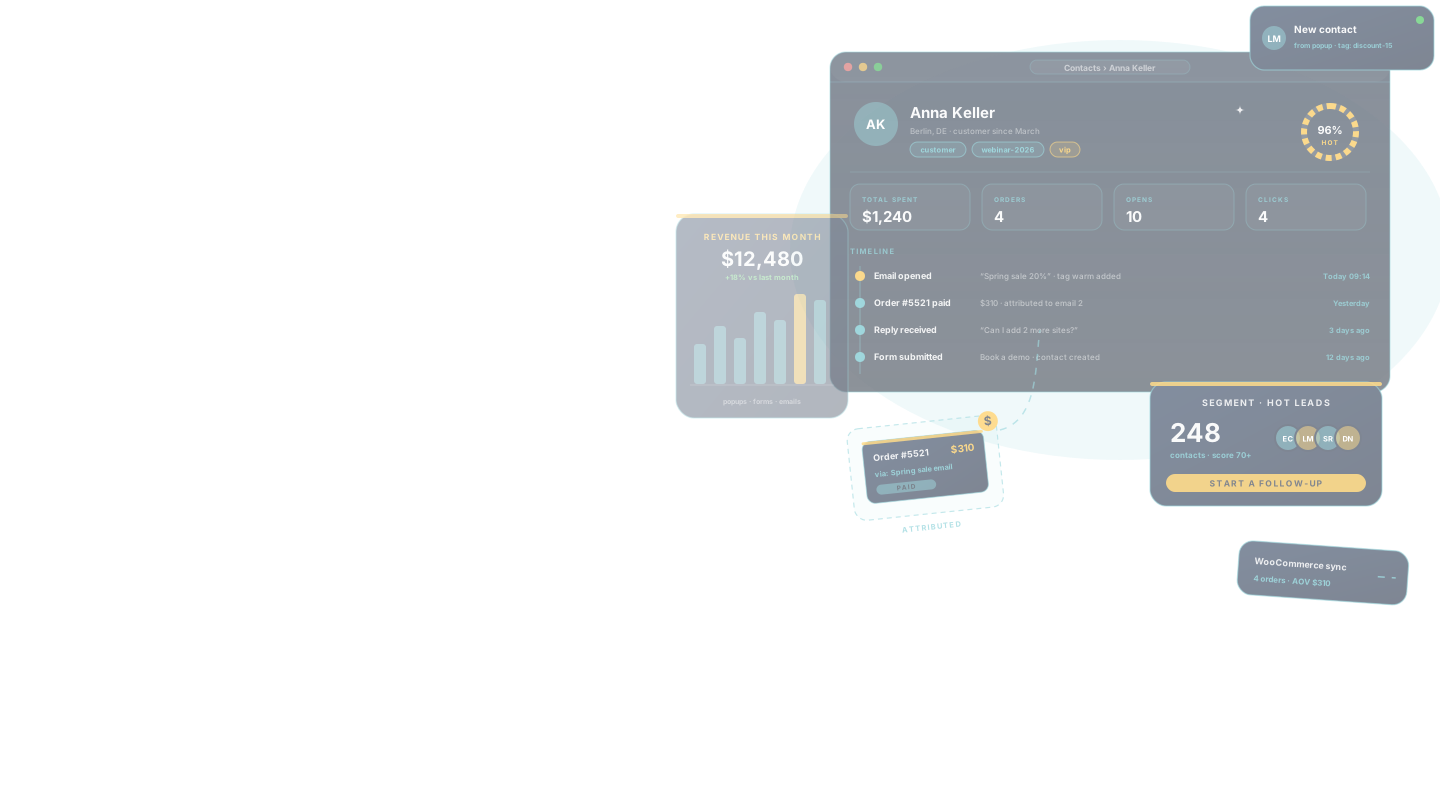
Your customer data is scattered across five tools. Leads in an inbox, buyers in WooCommerce, subscribers in a mail service, replies in Gmail. Here every contact lives on one record inside WordPress — tagged, scored, with every order, email and click. No per-contact fees, no Zapier, no monthly CRM bill.
Try the free version in your browserno install, no account
11,000+Active installs
4.5/5300+ reviews
∞Contacts, in your own database
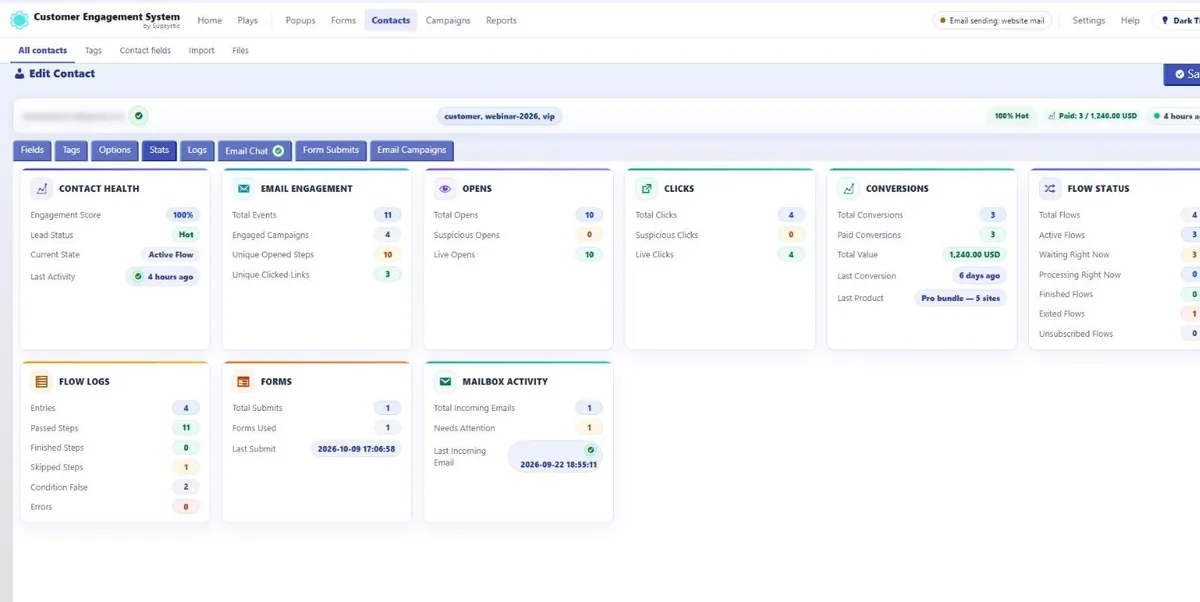
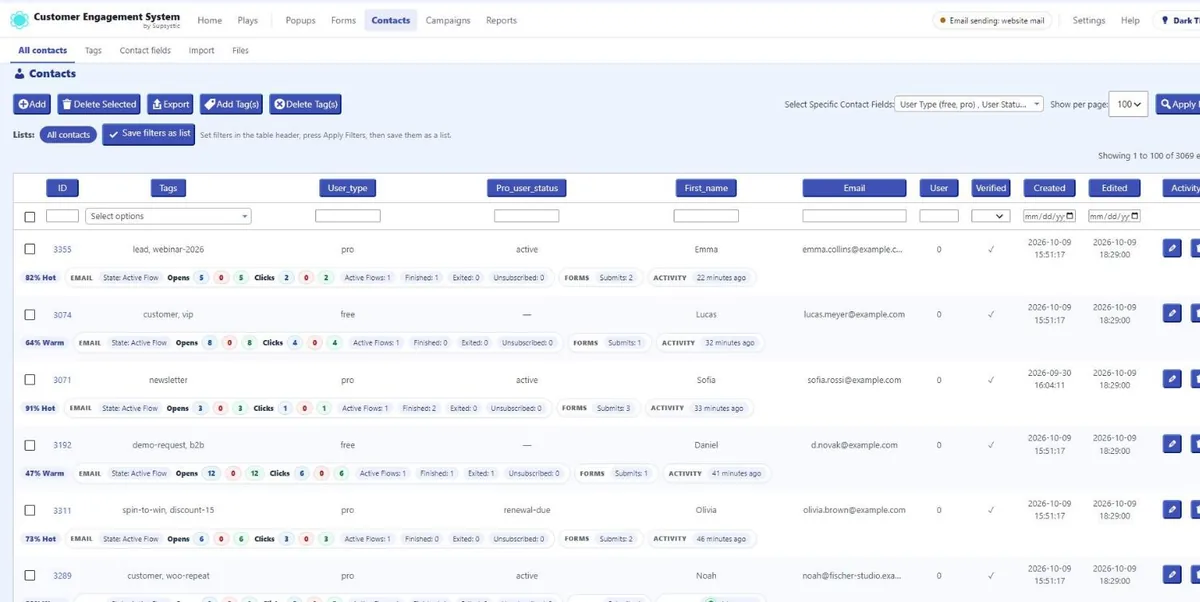
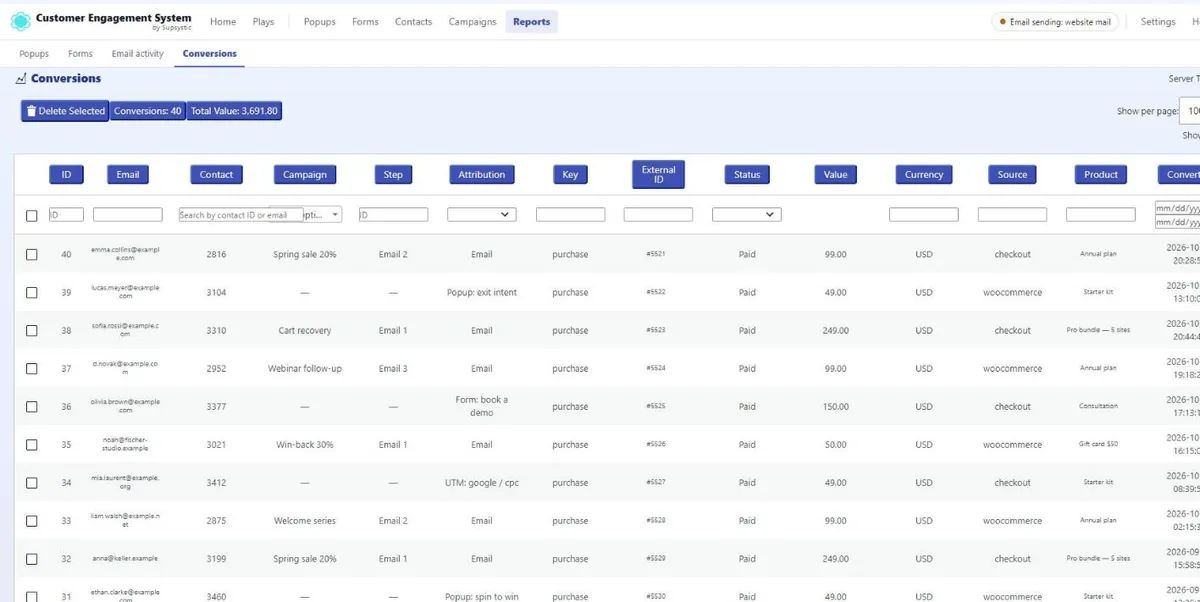
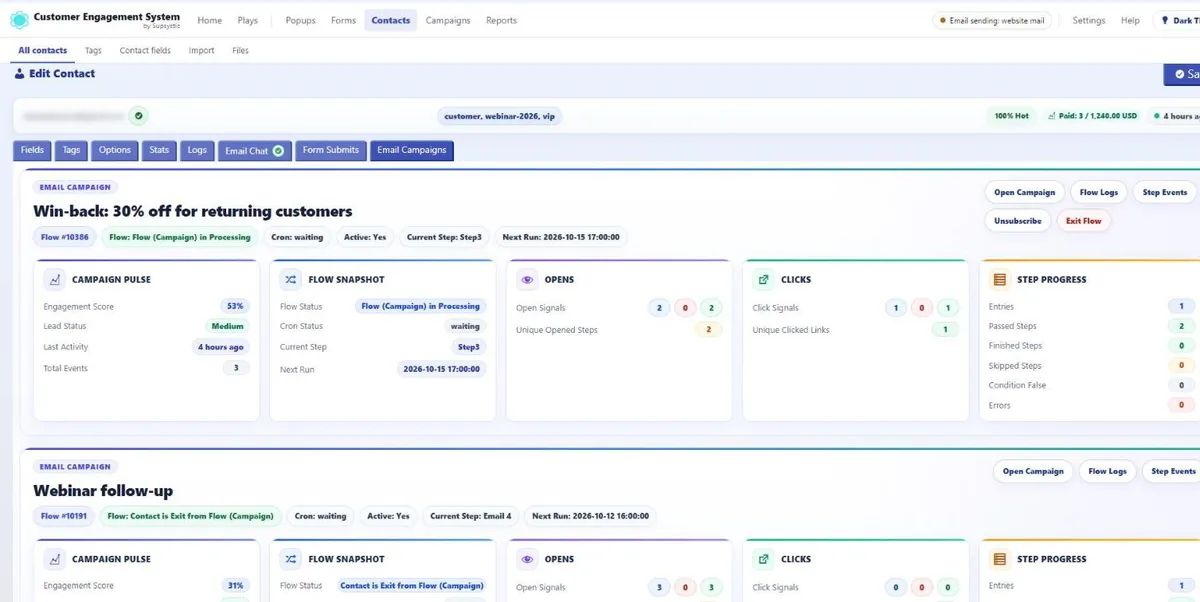
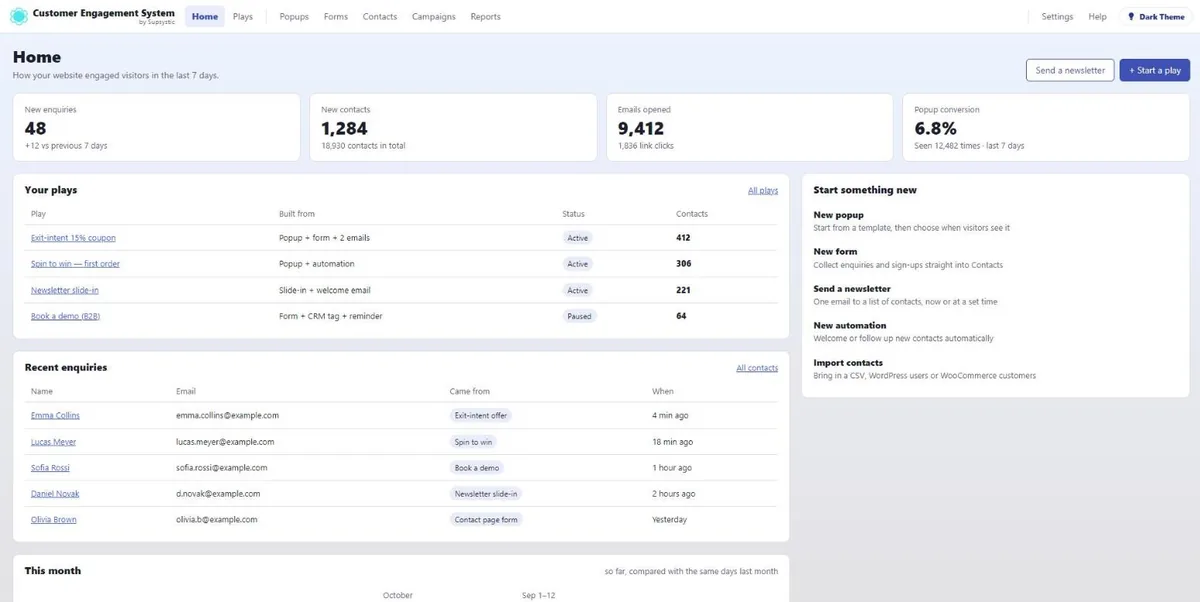
A CES contact card: engagement score, opens, clicks, conversions and flowsThe CES contacts list with tags, engagement score, opens, clicks and last activityCES conversions: every payment linked to the email, popup, form or UTM behind itA CES contact card: the email campaigns this contact is in, step by stepThe CES overview: enquiries, contacts, opened emails and conversion
Unlimited contacts, $0 eachHot / warm / cold scoringRevenue attributionEvery open & click trackedWooCommerce orders syncedIMAP replies as a chat
Inside the CRM

See Your Customers, Not Just Their Emails

Real screens from the plugin. Every contact, field, open, click and payment — inside your WordPress, in your own database.
Every contact, one recordTags, custom fields, orders, emails and form submits on a single profile.
Hot, warm or coldAn engagement score from real opens, clicks and submits shows who to call first.
Revenue you can traceEach payment is linked to the email, popup, form or UTM that brought it in.
Every open and clickPer contact, per campaign, per step — with the link they clicked.
No per-contact pricing500 or 50,000 contacts cost the same. Import, export and leave any time.
One contact, the whole storyEngagement score, opens, clicks, conversions, flows, form submits and mailbox replies on one card — with total spent at the top.
ContactsEvery contact with tags, a hot / warm / cold score, opens, clicks, form submits and last activity — filter, tag and save any view as a list.
The contact recordName, email, phone and your own fields, with a change history for every value.
Campaigns per contactWhich email flows a contact is in, the current step, the next send and how they reacted.
Revenue attributionEach payment tied to the campaign, step and source behind it, with totals at the top.
Email activityEvery send, open and click per contact — including the exact link and device.
Your own contact fieldsText, select, date and more — ready for forms, segments and personalised emails.
The overviewEnquiries, new contacts, opened emails and conversion for the last seven days, on one screen.

A CRM subscription charges you for every contact and keeps your audience on someone else’s servers. The CES CRM module keeps contacts in your WordPress database, with no limit, and fills them automatically from the popups, forms, emails and orders that already happen on your site.

Why the CES CRM

Your Audience, in Your Database, Filled Automatically

Nothing to sync. Contacts are created by forms, enriched by WooCommerce and emails, segmented by tags — and exported to CSV whenever you like.

Unlimited Contacts, Yours to Export

No per-contact tiers: a list of 500 or 50,000 costs the same. CSV in and out, WordPress users in, WooCommerce in — leave any time with everything.

Tags & Custom Fields

Tag from forms, emails, imports and manually; store any attribute in custom fields; filter and segment by both.

Full History, Replies Included

Popups seen, forms submitted, emails opened and clicked, automations started, orders placed — and IMAP replies threaded on the contact like a chat.

WooCommerce Built In

Import customers and orders, including guests; autoimport new ones; total spent and average order value on every contact.
One contact base, four ways in

Contacts From Forms, Users,
WooCommerce and CSV.

The CRM is filled by the rest of CES and by what your site already has. Each source keeps writing after the first import.
Free

Forms & Popups

Create-contact and identify-contact forms build the record, add tags and store custom-field values — on pages or inside popups.

  • Matched by email, no duplicates
  • UTM source stored on creation
  • Tags start automations
Free

WooCommerce & WordPress Users

Generate contacts from customers, orders (including guest orders) and registered users, then autoimport new ones.

  • Total spent and AOV per contact
  • Orders in the timeline
  • Autoimport on new user / order
Free

CSV Import & Export

Bring a list from any other tool with field mapping; export the whole base for backup or migration.

  • Map columns to fields and tags
  • Export filtered segments
  • No lock-in
See what Pro adds to contacts Every source is in the free version — Pro adds the rich field types.
How It Works

From Empty Base to Segmented Audience in Four Steps

Most sites have a usable contact base within the first hour: import what exists, then let forms and orders keep it current.

01

Import What You Have

CSV from your old tool, WordPress users, WooCommerce customers and orders. Map the columns; switch on autoimport.
02

Define Tags & Fields

Create the tags your automations will use (lead, customer, vip…) and custom fields for what you want to remember.
03

Connect Forms & Popups

Set each form to create or identify contacts and to add its tags. From now on the base fills itself.
04

Segment & Follow Up

Filter by tag, field or activity; send a campaign or let an automation run on the tag.
Who It's For

Simple Enough for a Mailing List. Deep Enough for a Store.

Whether you keep a subscriber list or track repeat buyers with order history, it is the same contact table.

The CES CRM works especially well for:

WooCommerce Stores

Customers with orders, total spent and AOV; tags by category bought; win-back and VIP automations on the data.
Most Common

B2B & Service Businesses

Leads from quote forms with custom fields, replies threaded on the contact, sales follow-ups tagged and tracked.

Newsletters & Publishers

Subscribers with source and interest tags, opens and clicks per contact, unsubscribes handled.

Courses & Memberships

Members imported from WordPress users, role and enrolment as tags, onboarding history.

Agencies

A client-owned CRM inside the client’s WordPress, no monthly seat fees to pass on.
Start with an import. Grow into segments when the list does.
The contact timeline

Every Touchpoint on One Record

Because popups, forms, emails and WooCommerce are modules of the same plugin, the history is not stitched together from integrations — it is written directly as things happen.
Free

Read it

Open a contact and see the popups, forms, emails, automations, orders and replies in order, with dates and sources.

Free · with Email

Act on it

Tags added by any event start automations; segments built from tags and fields receive campaigns; exports carry everything.

About Email Campaigns & Automations
CES · contact · [email protected]
Popup › Exit-intent offer shown on /pricing
✓ Form “Newsletter” submitted → contact created · tags lead, pricing-page · UTM google/cpc
Automation › Welcome sequence started
✓ Email 1 opened · Email 2 clicked → tag warm
WooCommerce › Order #5521 paid $310
✓ Contact: customer · total spent $310 · AOV $310
IMAP › Reply: “Can I add 2 more sites?”
✓ Shown in the contact chat · tag support-question
 
For Developers

Developer-Friendly by Design

Built to work cleanly inside real WordPress projects. Developers get:
Contacts in indexed WordPress tables
Internal API to create, find and tag contacts
Hooks on contact create, update and tag
CSV import with column mapping
WooCommerce and user autoimport
IMAP polling via WP-Cron
No external calls; data stays on the server
Custom fields with typed inputs (Pro types)
Conversion Tracking API endpoint
It integrates with your site — it doesn’t fight it.
Capabilities

Collect Once. Use It in Every Module.

A tag set by a form is read by a popup, used by an automation and filtered in a campaign. A custom field filled by an import is merged into an email. The CRM is the shared memory of the system.
The Complete Solution

Built for Relationships.
Not Just Rows.

A contact table is easy. What makes a CRM useful is that every other tool writes to it and reads from it. In CES, they do.
The Professional Edge
A customer who is recognised on the third visit is treated like one. A row in a spreadsheet is not.
01

Contacts Without Limits

Unlimited contacts in Free and Pro, stored in your WordPress database with tags, custom fields and full history.
Core
02

Tags Drive Everything

Added by forms, emails, imports, WooCommerce and by hand; used by automations, popups and campaign segments.
Segmentation
03

WooCommerce Profile

Orders, total spent and average order value on the contact; autoimport of new customers and orders, guests included.
Store
04

Replies in Context

IMAP brings replies to your campaigns onto the contact as a chat, next to the email that prompted them.
Conversation
05

Conversions Attributed

The Conversion Tracking API links a purchase to the popup or email that started it, up to 180 days later.
Attribution
Start with a CSV import on one site. The same setup still holds when it is fifty thousand contacts fed by a store.
Stop Renting Your Audience

Your Contacts. Total Control.

A CRM subscription meters your audience. Here is what changes when the CRM is one module of a plugin on your own site.

Managing contacts with a CRM subscription compared with the CES CRM module
Task
CRM Subscription
The rented way
CES Way
CES CRM
The owned way
💰Cost at 10,000 contactsA monthly tier that rises with the list$0 in Free; one Pro license for the extras
🔒Where the data livesVendor cloud, vendor export rulesYour WordPress database; CSV export any time
🔌Getting data inIntegrations, webhooks, Zapier tasksForms, popups, WooCommerce and users write directly
🛒Order historyA paid e-commerce integrationOrders, total spent and AOV imported and kept current
💬RepliesA separate inbox toolIMAP replies threaded on the contact
🔧MaintenanceAPI keys, sync errors, tier reviewsOne plugin, one update
✕ Metered and externalGet CES Pro →
Alternatives

CES CRM vs FluentCRM, Jetpack CRM and HubSpot

The CRM options WordPress users compare most often, on the questions that decide a purchase. Single-site annual prices as published by the vendors.
CES CRM compared with FluentCRM, Jetpack CRM and HubSpot on price, contacts, sources and scope
FeatureCESCRM, Popup, Forms, Emails & AutomationsFluentCRMJetpack CRMHubSpot
Single-site Pro price$99 / year$129 / year$11 / month + extensionsFree tier; Starter $20 / seat / month
Lifetime licensefrom $749 (up to 5 sites)
Free contactsUnlimitedUnlimitedUnlimitedMetered marketing contacts
Data stored in WordPressHubSpot cloud
Popups from the same pluginBasic
Form builder from the same pluginSeparate pluginBasic
Email automations from the same pluginExtensionPaid tier
WooCommerce orders, total spent, AOVProExtensionIntegration
IMAP replies on the contactExtension
Per-contact or per-seat pricingNoneNoneNoneYes
Prices and feature availability as published on the vendors’ own sites, checked 17 September 2026. Plans and limits change; check the vendor before deciding.
Risk-Free Purchase

100% Risk-Free Guarantee

Not sure if it's the right fit?
Try Pro for 30 days. If it doesn't do what you bought it for, write to support and get every cent back.
30-DayMoney-Back Guarantee
Visa · Mastercard · PayPal · Stripe

Every CES Pro license comes with a 30-day money-back guarantee. Not satisfied within the first month — for any reason — contact support and we refund the purchase. No forms to fill in, no questions to answer.

Pro Features

Where Pro Takes Over

The CRM itself is free: unlimited contacts, tags, fields, history, imports and IMAP. Pro is for when the record needs richer fields and the modules feeding it need their Pro options.

Pro Contact Field Types

Files, dates and times, ratings, ranges, colours, address search, languages, countries, WordPress and WooCommerce object lists.

Pro Forms Feeding the CRM

Masks, uploads and email verification on the forms that create contacts.

Pro Popup Targeting

Countries, referrers, user roles and post-checkout triggers for the popups that capture contacts.

Branching Automations

Conditions and unlimited steps in the chains that act on tags.

10+ Mail Providers

Transactional providers for the campaigns sent to the base.

Premium Support

Direct help from the team that built it.
No artificial limits
Unlimited contacts in Free. Upgrade only when a Pro row in the comparison below is the one you need.
Free vs Pro

Everything in the Box — and Exactly What Pro Adds

25+ capabilities, compared line by line and checked against the plugin itself.
20+in Free
Free
$0 forever
Unlimited contacts, tags, custom fields, activity history, CSV / WordPress / WooCommerce import with autoimport, IMAP replies, exports, internal API.
Download Free Or run it in a sandbox first
25+in Pro
Pro
from $99 per year
lifetime from$749
Rich contact field types, plus the Pro options of the modules that feed the CRM: forms, popups, automations and mail providers — and premium support.
View License Options
Full feature comparison
Capability
Freewordpress.org
Profrom $99/yrlifetime from $749
Contacts
Contacts
Unlimited
Unlimited
Tags
Custom fields
Pro field types: file, date/time, rating, range, color, address, lists
Activity history per contact
Search, filter and segment by tag / field
Sources
Forms and popups create / identify contacts
CSV import with mapping
CSV export
WordPress users import and autoimport
WooCommerce customers and orders import (incl. guests)
WooCommerce autoimport of new customers and orders
Total spent and average order value
Conversation
IMAP replies shown as a chat on the contact
Bounce processing via IMAP
Unsubscribe handling
Tracking
UTM source stored on creation
Email opens and clicks on the contact
Conversion Tracking API
Modules feeding the CRM
Form field types
10+
30+
Masks, uploads and email verification on forms
Popup targeting: countries, referrers, roles
Automation steps per chain
Up to 4
Unlimited
Mail providers
SMTP / PHP mail
+ 10+ providers
System
Internal API and hooks
Data stays in your WordPress database
Premium support
Every Pro license unlocks every capability across Popup, Forms, CRM and Email — tiers differ only in how many sites they cover.
Pro is a superset of Free: nothing you build on the free version has to be rebuilt after upgrading.
Licensing

Choose your licence and get started

Flexible options for individuals, businesses and agencies.

Choose your licence first, then your term.

1 Year
Introductory price
$99 / year
Renews at $99/year
1 Site License
All Pro Features
Premium Support
Buy Now
30-Day Money Back Guarantee
3 Years
Best long-term value
$249 / 3 years
That's only $83/year
1 Site License
All Pro Features
Premium Support
Buy Now
30-Day Money Back Guarantee

Join at the introductory price – and keep that same price when you renew.

Choose 3-year or lifetime options for even greater savings.
Every tier unlocks all four modules
There is no per-module upsell. A Pro license switches on the Pro triggers, 20+ Pro field types, masks and uploads, 10+ mail providers and premium support — on every site the license covers.
Questions

Frequently Asked Questions

The questions people ask before they install — and the ones they ask support in the first week.

Is the CRM really free?

Yes. Unlimited contacts, tags, custom fields, history, CSV / WordPress / WooCommerce import with autoimport, IMAP replies and exports are all in the free plugin. Pro adds rich contact field types and the Pro options of the modules that feed the CRM.

Is there a contact limit?

No, in either version. Contacts are rows in your WordPress database.

Can I import from Mailchimp, Brevo or another CRM?

Yes — export a CSV there, import it here with column-to-field mapping, including tags.

Does it import WooCommerce customers and orders?

Yes. Generate contacts from customers and orders (guest orders included), see total spent and average order value on each contact, and switch on autoimport so new customers and orders arrive automatically.

How do replies get into the CRM?

Connect a mailbox over IMAP in Mail settings. Replies to your campaigns are matched to the contact and shown as a chat; bounces are processed from the same mailbox.

Can I export everything and leave?

Yes. CSV export of all contacts, fields and tags at any time. There is no lock-in.

Where is the data stored? Is it GDPR-friendly?

In your WordPress database only. Nothing is sent to Supsystic. Export or delete a contact on request from the contact screen.

Which license do I need for several sites?

Personal covers 1 site, Multi-site up to 5, Agency unlimited. All contain the same Pro with all four CES modules.

Is there a money-back guarantee?

Yes — 30 days on every Pro license.

Support

Real Support From People Who Know the Plugin

The CES CRM is built, used and supported by the same team as the rest of the system — the people who answer are the people who wrote the import.

Start Owning Your Audience in WordPress

Install the free version, import your list and watch forms and orders fill it. Upgrade when you need the Pro fields or the Pro options of the other modules.