Customer Engagement System by Supsystic

WordPress Customer Engagement Plugin

Four tools, four bills, four places where your customers get lost. Popups in one, forms in another, contacts in a spreadsheet and emails in a service that charges per subscriber. CES does all four inside WordPress on one contact record — capture, know, follow up and see the revenue. No Zapier, no per-contact fees, no data leaving your site.
Try the free version in your browserno install, no account
11,000+Active installs
4.5/5300+ reviews
4-in-1Popup · Forms · CRM · Email
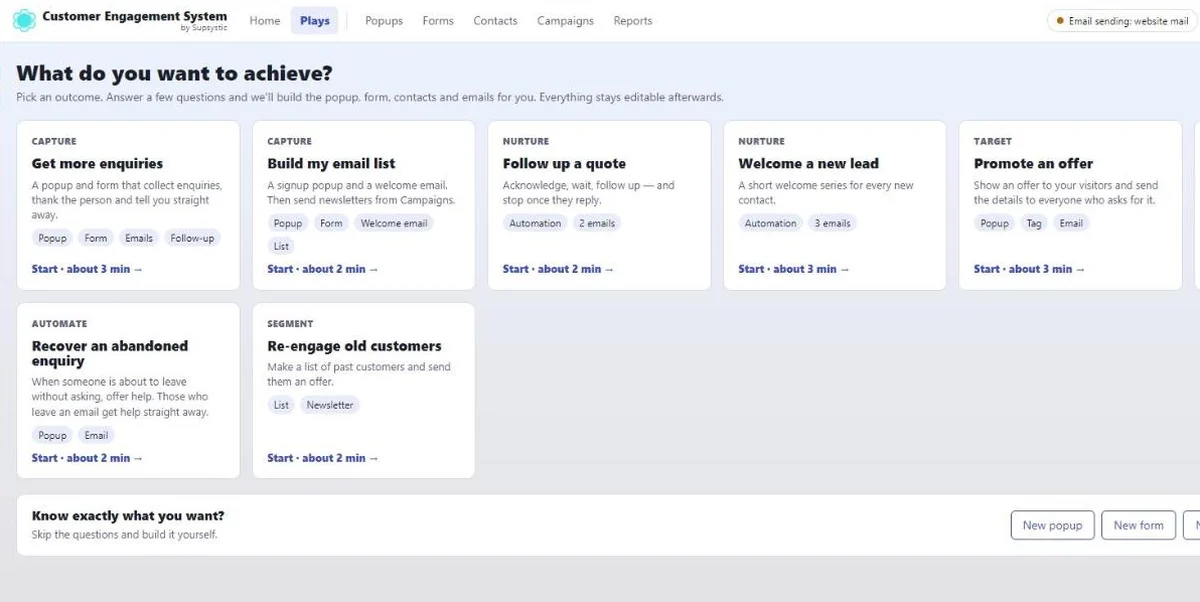
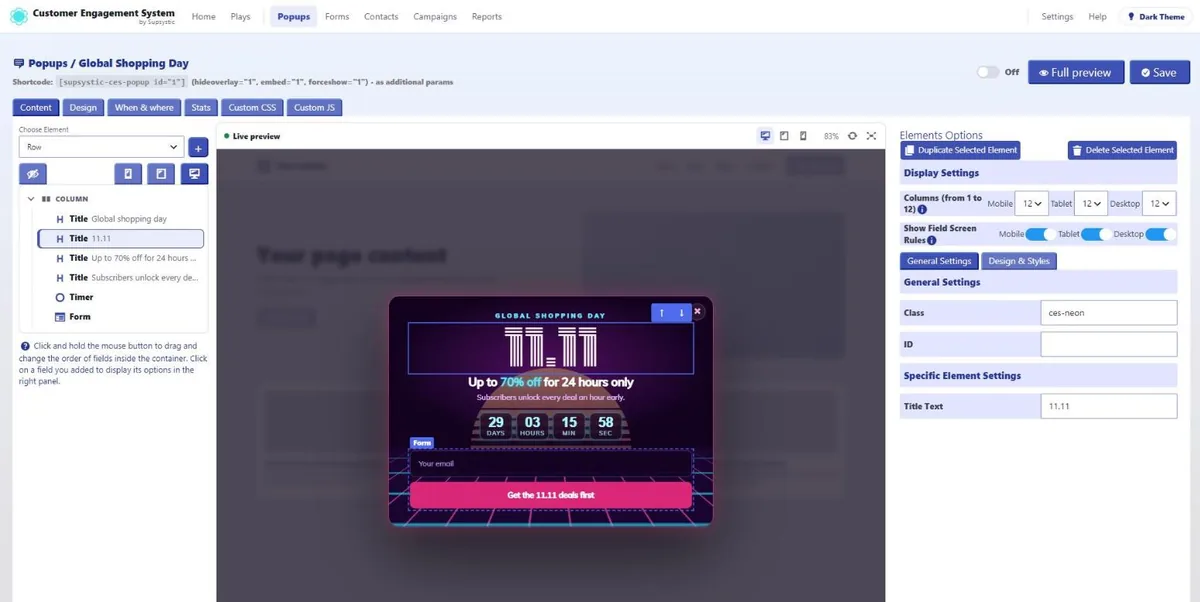
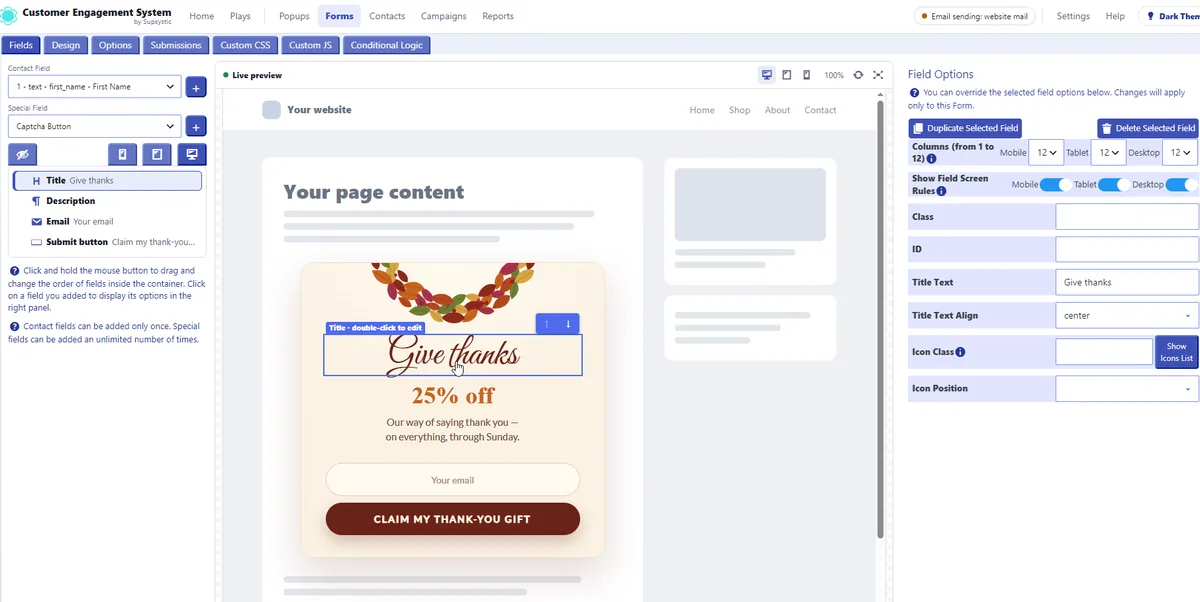
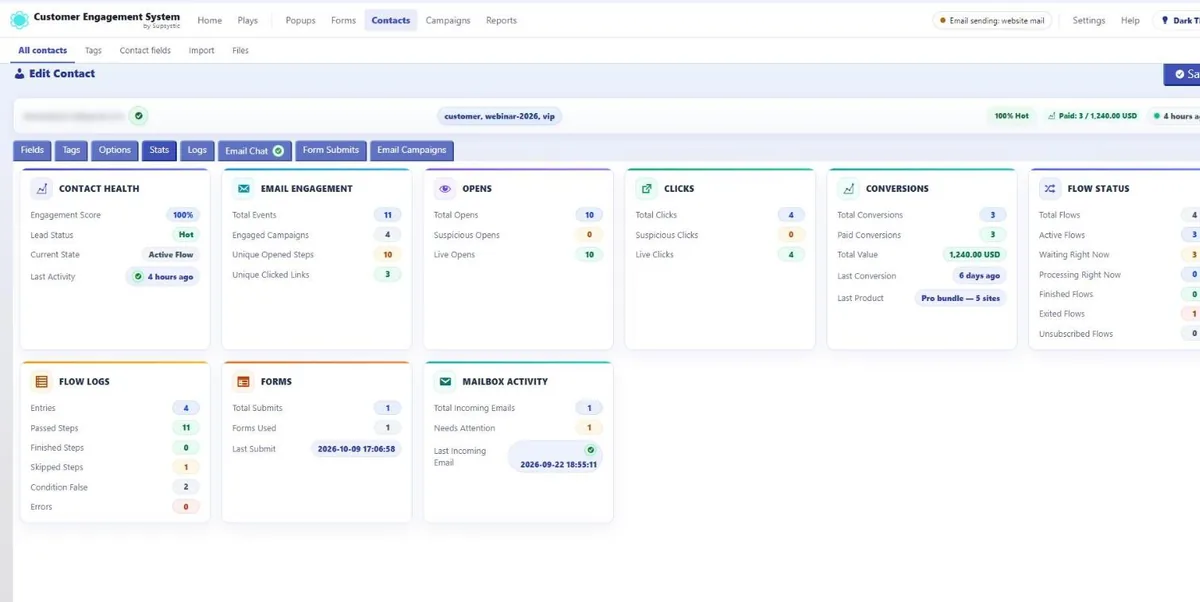
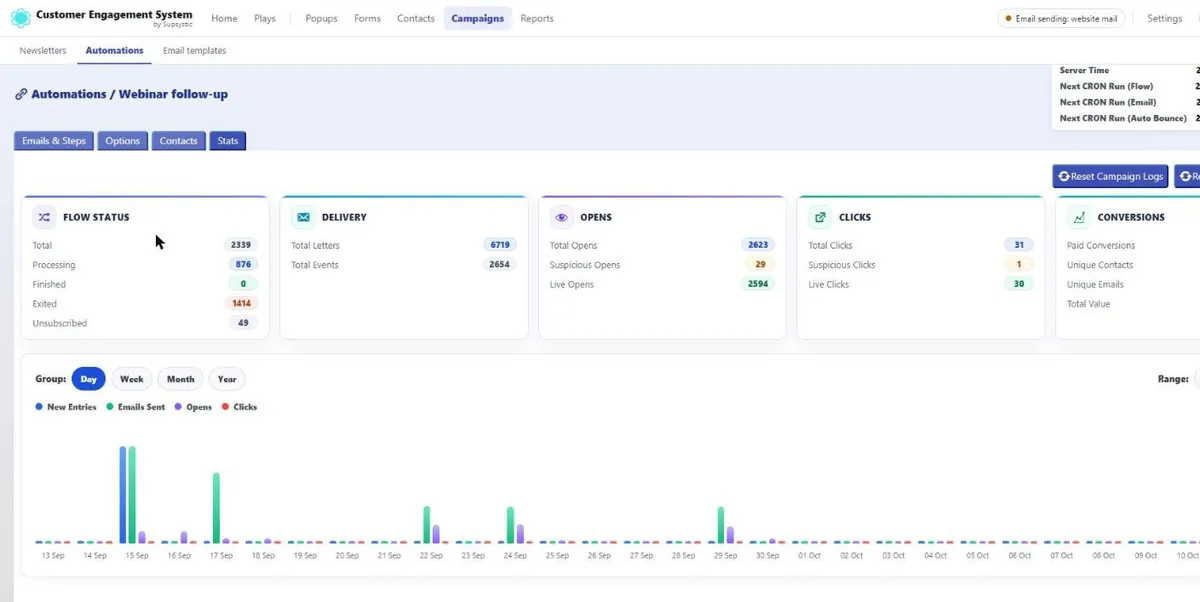
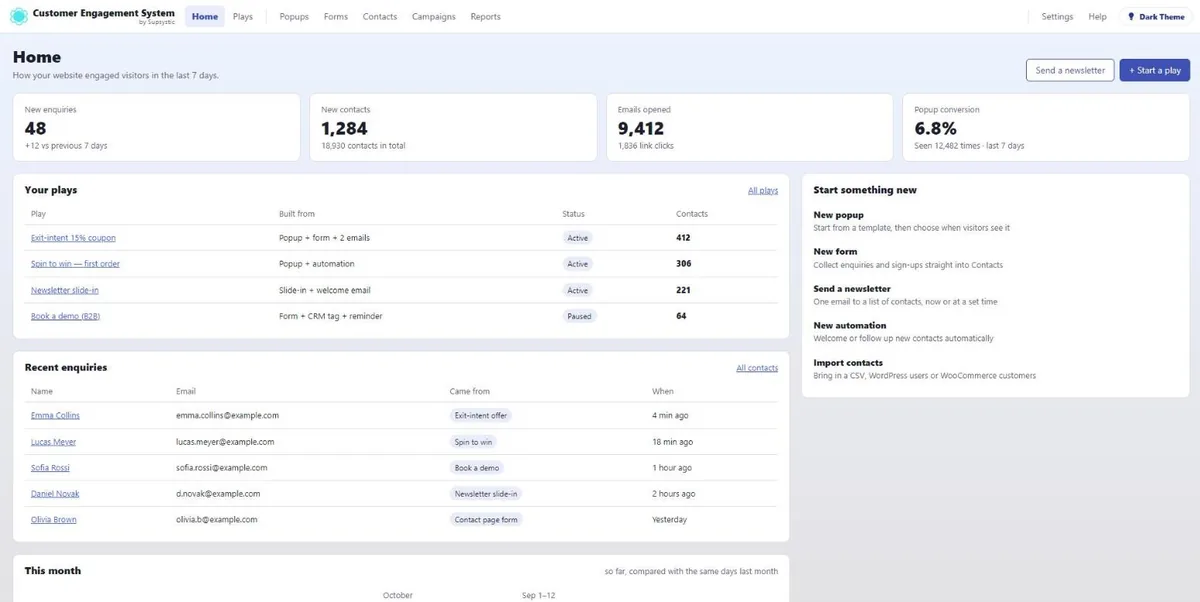
The CES popup editor: an element picked in the live preview, its options on the rightThe CES form builder: a field picked in the form, its options on the rightA CES contact card: engagement score, opens, clicks, conversions and flowsCES automation stats: flow status, delivery, opens, clicks and conversionsThe CES overview: enquiries, contacts, opened emails and conversion
120+ animated popup templates90+ form templatesCRM with hot / warm / cold scoringTag-triggered email chainsRevenue attributionWooCommerce built in
Inside CES

Four Modules. One Record for Every Customer.

Real screens from the plugin — popups, forms, the CRM and email automations working on the same contacts, inside your WordPress.
One contact recordPopups, forms, emails and orders all write to the same profile.
200+ animated templates120+ popups and 90+ forms, each with its own form and matching emails.
Automations start themselvesA tag from any module starts the right email chain — no manual sends.
Revenue you can traceEvery sale credited to the popup, form or email that earned it.
No per-contact pricingUnlimited contacts in your own database. Import, export and leave any time.
One record per customerEngagement score, opens, clicks, conversions, flows, form submits and mailbox replies on one card — whichever module they came through.
Popups in a visual editorClick any element in the live preview and change it; triggers and targeting sit one tab away.
Forms in the same editorFields, validation and layout with the same live preview — on a page, in a block or inside a popup.
Email automationsEvery chain with the people in it, emails sent, opens and clicks.
Logic on every stepDelays, required and forbidden tags, retries and tag actions on open, click or unsubscribe.
ContactsTags, a hot / warm / cold score, opens, clicks, form submits and last activity for every contact.
Revenue attributionEach payment tied to the campaign, step and source that brought it in.
Write emails visuallyRows, columns, text, images and buttons with a live preview and contact placeholders.
The overviewEnquiries, new contacts, opened emails and conversion for the last seven days, on one screen.
Inside the plugin

The whole library, right in your WordPress

120+ animated popup templates and 90+ form templates — click one and it is installed with its form, emails and tags.

One-click colours

Your brand colours without digging through settings

Installed a template? Pick a palette — White, Midnight, Forest, Neon night, Coffee, Royal and 20+ more. Background, text, form and buttons change together, and every detail stays editable afterwards.

E-marketing on WordPress has been a plugin stack: a popup plugin, a form plugin, a CRM subscription, an email service, and a Zapier bill to glue them together. CES replaces the stack with one plugin whose four modules share one database, one editor language and one license.

Why CES

Four Tools Become One System

Each module is complete on its own. Together they do what separate plugins cannot: react to what a contact did in another module.

Popups That Know the Visitor

Show an offer only to first-time visitors, only on the pricing page, only if they are not already a customer in your CRM.

Forms That Create Contacts

Every submit creates or updates a contact, adds tags and can start an automation — no webhook, no third-party CRM.

A CRM Inside WordPress

Contacts, tags, custom fields, full activity history, WooCommerce orders and IMAP replies in one card — in your own database, with no per-contact fees.

Email That Sends Itself

Campaigns and step-by-step automations with delays, conditions and tag actions, through your SMTP or 10+ providers.
How It Works

From Install to First Automation in Four Steps

Most sites capture their first contact within ten minutes. The order below is the one the dashboard walks you through.

01

Install & Connect Mail

Install from WordPress.org. Enter your SMTP (or keep PHP mail) and, if you want replies and bounces tracked, IMAP.
02

Build a Form

Pick a form type, drag the fields in, decide which tags a submit adds. Embed it with a block or shortcode — or put it in a popup.
03

Show It With a Popup

Choose a template, set the trigger (exit intent, scroll, click…) and the audience (pages, devices, first-time visitors, countries).
04

Let the Automation Follow Up

Create a chain: welcome email, wait two days, second email, add a tag. From now on every new contact gets the same treatment.
One plugin, four modules

Popup, Forms, CRM
and Email Automations.

Install once. Every module is in the free version; Pro switches on the advanced options across all four at once. Each module has its own page with the full feature list.
Free & Pro

Popup

Centre, corner and edge popups with overlay, 10+ triggers and 10+ targeting rules.

  • Exit intent, scroll, click, page load, bottom of page
  • Countries, referrers, user roles, URL rules (Pro)
  • Views, CTR, submits, UTM stats per popup
About the Popup module
Free & Pro

Forms

A form builder with every form type, 30+ field types and spam protection, standalone or inside a popup.

  • Contact, lead, login, signup, reset-password forms
  • Conditional logic in Free; masks and file uploads in Pro
  • Built-in spam protection, auto-replies, admin alerts
About the Forms module
Free & Pro

CRM

A contact base with tags, custom fields and a timeline of everything the contact did.

  • CSV, WordPress users and WooCommerce import
  • Orders, total spent and AOV per contact
  • IMAP replies shown as a chat
About the CRM module
Free & Pro

Email Campaigns & Automations

Templates, campaigns and multi-step automations driven by tags, with open and click tracking.

  • Delays, dates, conditions (Pro), tag actions
  • SMTP + IMAP bounce handling free; 10+ providers Pro
  • Conversion Tracking API links revenue to emails
About the Email module
See what Pro adds to each module Every module is included with Pro — no separate purchase.
Why this is the future of WordPress e-marketing

One Timeline. Every Touchpoint.

The SaaS model puts your audience in someone else’s database and charges per contact. CES keeps the whole loop — capture, profile, follow-up, revenue — inside WordPress, where your content and your store already live.
Today

Stack of five tools

Popup plugin, form plugin, CRM SaaS, email SaaS, automation glue. Five logins, five invoices, and a contact whose history is split five ways.

With CES

One plugin, one record, one price

Every module reads and writes the same contact. A popup can react to an order; an email can react to a popup. Unlimited contacts, no per-seat fees.

From $99 per year, all four modules
CES · contact timeline · [email protected]
Popup › Exit-intent offer shown on /pricing (first visit, DE, mobile)
✓ Form “Newsletter” submitted → contact created, tags: lead, pricing-page
Automation › Welcome sequence started (3 steps)
✓ Email 1 opened → tag opened-1 · Email 2 clicked → tag warm
WooCommerce › Order #5521 paid — $310
✓ Contact updated: customer, total spent $310, AOV $310 · conversion attributed to Email 2
IMAP › Reply received: “Can I add 2 more sites?”
✓ Shown in the contact chat → tag support-question → automation “Upsell” started
 
Who It's For

For Anyone Who Has Ever Paid for Three Tools to Do One Job

If you run a WordPress site that needs to turn visitors into contacts and contacts into customers, this is the toolset. It scales from one newsletter form to a store with tens of thousands of contacts.

CES works especially well for:

WooCommerce Stores

Exit-intent coupons, post-checkout popups, order-based tags, revenue per contact and win-back automations — with orders imported automatically.
Most Common

Bloggers & Newsletters

Subscribe forms in popups and corner slide-ins, a welcome series that sends itself, and a list that lives in your own database.

Agencies & Freelancers

One plugin to install on every client site instead of four; the Multi-site and Agency licenses cover 5 or unlimited sites.

Courses & Memberships

Login, signup and reset-password forms, user-role targeting, drip sequences after enrolment.

B2B & Service Businesses

Lead forms with conditional fields, contact history for sales, IMAP replies next to the record, follow-up chains.
Start with one form. Grow into automations when the list does.
The Complete Solution

Built as a System.
Not a Bundle.

Bundles are separate plugins sold together. CES was written as one product: one settings screen, one contact table, one stats model, one license.
The Professional Edge
A contact who is remembered comes back. One who is asked the same question three times does not.
01

One Contact Base for Everything

Popups, forms, campaigns and WooCommerce write to the same contact. Import from CSV or WordPress users, autoimport new customers and orders, export any time.
CRM
02

Tags Are the Glue

A form adds a tag; a tag starts an automation; an email click adds another tag; a popup hides itself for contacts that have it. No workflow tool needed.
Automation
03

Stats Where the Decision Is Made

Views, unique views, CTR, submits, bounces and time-on-popup per popup; opens, clicks and unsubscribes per email; conversions per contact.
Analytics
04

Your Mail Stack, Not Ours

PHP mail or your SMTP with IMAP bounce processing in Free. Pro adds Microsoft 365, Google Workspace, Zoho, Fastmail, SendGrid, Mailgun, Brevo, Postmark, SMTP2GO, Resend and Amazon SES.
Deliverability · Pro
05

Revenue Attribution

The Conversion Tracking API stores a 180-day browser token, so a purchase weeks after the click still credits the email or popup that started it.
Tracking
Start with one newsletter popup on one site. The same setup still holds when it is forty automations across a dozen client stores.
Stop Wiring Tools Together

One System. Total Control.

Here is what changes when the popup, the form, the contact base and the email tool are one plugin instead of four subscriptions.

Running WordPress e-marketing with separate tools compared with CES
Task
Separate Tools
The plugin stack
The CES Way
Customer Engagement System
The connected way
⚡Capturing a leadPopup plugin → form plugin → webhook → CRM SaaS; four places to breakPopup shows a CES form; submit creates the contact and starts the automation
👤Knowing the contactHistory split across tools; the CRM never sees the popup, the email tool never sees the orderOne record: popups seen, forms sent, emails opened, orders, replies
🏷SegmentingSync tags between services on a schedule; hope the mapping holdsTags set by forms, emails, imports and WooCommerce — instantly, in one table
💰Cost at 10,000 contactsCRM tier + email tier + automation tier, billed per contact per monthFrom $99 per year for all four modules; contacts are unlimited
🔒Data ownershipYour audience lives on a vendor's servers under their export rulesEverything in your WordPress database; CSV export any time
🔧MaintenanceFour plugins to update, API keys to renew, integrations to re-testOne plugin, one update, one support team
✕ Fragile and expensiveGet CES Pro →
Alternatives

CES vs Popup Maker, OptinMonster, WPForms and FluentCRM

The tools people compare when they set up e-marketing on WordPress. Each of them covers one or two of the four modules; the prices are the vendors’ published single-site annual plans.
CES compared with Popup Maker, OptinMonster, WPForms and FluentCRM on scope, price and licensing
FeatureCESCRM, Popup, Forms, Emails & AutomationsPopup MakerOptinMonsterWPFormsFluentCRM
Single-site Pro price$99 / year$87 / yearfrom $9 / month billed yearly, pageview-limitedfrom $49.50 / year$129 / year
Lifetime licensefrom $749 (up to 5 sites)
PopupsLite popups
Form builderVia other form pluginsBasic optin fieldsLead forms
CRM — contacts, tags, historySubscribers onlyEntries only
Email campaigns & automationsVia integrationsVia integrations
Free versionAll 4 modules, no contact limitFree popupsFree liteFree liteFree lite
WooCommerce orders in contact profilePro
Data stored in your WordPress databaseVendor cloud
Modules that need no other plugin41112
Prices and feature availability as published on the vendors’ own sites, checked 17 September 2026. Plans and limits change; check the vendor before deciding.
What users say

Straight From the Reviews

Every quote below is a real review left on WordPress.org for the plugin that became CES. Each one links to the review it came from, so you can read the rest and the reply.
4.5/5300+ reviews on WordPress.org
Finally a popup plugin that truly works

“Thank you for creating this plugin, it’s so versatile and solid at the same time. I’ve tried so many in the past, but none as excellent as this one.”

Really adds a dynamic element to our site

“I’m only using this plugin for some fairly routine pop-ups (click-based), but so far it’s been easy to create and implement them. Looking forward to using some more complex criteria for the pop-ups in the near future.”

Easy to create your Popup

“Congratulations on your work!! Personally, I finally found what I was looking for. I liked it a lot. It took me 5 minutes to create a Popup. Thank you for letting us enjoy your creation. Good luck with the sales!!”

Convenient and simple

“It took me a long time to choose my plugin. This one is one of the most successful. The functionality I needed was in the free version – Christmas Countdown. There was one problem with installation, but support helped quickly.”

Works great

“Can be as simple or complex as you need. Many customization options.”

Read all reviews

Already using Popup by Supsystic? Nothing breaks.

CES ships under the same plugin slug, so it arrives as a normal update. Every popup you built keeps working and stays editable in Classic Popup by Supsystic for as long as you need it. Rebuild in the new editor when you want the new triggers and the shared contact base — not before.

Same slug: popup-by-supsysticClassic popups keep runningClassic editor stays availablePro license carries over
Risk-Free Purchase

100% Risk-Free Guarantee

Not sure if it's the right fit?
Try Pro for 30 days. If it doesn't do what you bought it for, write to support and get every cent back.
30-DayMoney-Back Guarantee
Visa · Mastercard · PayPal · Stripe

Every CES Pro license comes with a 30-day money-back guarantee. Not satisfied within the first month — for any reason — contact support and we refund the purchase. No forms to fill in, no questions to answer.

Pro Features

Where Pro Takes Over

The free version is a complete system — all four modules, unlimited contacts, no expiry. Pro is for when you need the advanced triggers, the rich field types, branching automations and a transactional mail provider.

Advanced Pro Popup Triggers

Inactivity, after a comment or review, after WooCommerce checkout, link follow, built-in page, AdBlock detected, N pages visited — plus countries, referrers, URL rules and user roles.

20+ Pro Field Types

File and multi-file upload, date/time, range, rating, color, address search, countries, languages, posts, categories and WooCommerce products, categories, attributes.

Masks & Validation

Input masks and regex patterns, email verification before a contact is created.

Branching Automations

Conditions inside a chain — opened, clicked, has tag — and unlimited steps per automation (Free allows 4).

10+ Mail Providers

Microsoft 365, Google Workspace, Zoho, Fastmail, SendGrid, Mailgun, Brevo, Postmark, SMTP2GO, Resend, Amazon SES.

Custom JavaScript

Per-popup and per-form JS on top of the custom CSS that is already in Free.
No artificial limits
Use the free version as long as you like. Upgrade only when a Pro row in the comparison below is the one you need.
Free vs Pro

Everything in the Box — and Exactly What Pro Adds

40+ capabilities, compared line by line and checked against the plugin itself.
30+in Free
Free
$0 forever
All four modules, unlimited popups, forms and contacts, the core triggers and targeting rules, 10+ field types, conditional logic, 4-step automations, SMTP + IMAP, full stats.
Download Free Or run it in a sandbox first
40+in Pro
Pro
from $99 per year
lifetime from$749
More triggers and targeting rules, 20+ more field types, masks and uploads, unlimited automation steps with conditions, 10+ mail providers, custom JS and premium support.
View License Options
Full feature comparison
Capability
Freewordpress.org
Profrom $99/yrlifetime from $749
Popup
Popups in any position, with or without overlay
Triggers: page load, click, scroll, exit intent, bottom of page
Triggers: inactivity, comment/review, WooCommerce checkout, link, built-in page, AdBlock, N pages
Targeting: pages, schedule, devices, IPs, languages, logged-in, frequency
Targeting: countries, referrers, URL rules, user roles
Template library and visual editor
Stats: views, unique, CTR, submits, bounces, time, UTM
Custom CSS
Custom JavaScript
Classic popups keep working and stay editable
Forms
Form types: simple, create contact, identify contact, login, signup, reset
Field types
10+
30+
Conditional logic
Input masks and regex validation
File and multi-file upload
WooCommerce products, categories, attributes as fields
Spam protection: honeypot + CAPTCHA
Admin notification and auto-reply emails
Tags on submit
Email verification before contact is created
CRM
Contacts
Unlimited
Unlimited
Tags and custom fields
Activity history per contact
CSV import and export
WordPress users import and autoimport
WooCommerce customers, orders, total spent, AOV
IMAP replies as a chat on the contact
Pro contact field types (files, dates, ratings, address, lists)
Email Campaigns & Automations
Email templates and campaigns
Automation steps per chain
Up to 4
Unlimited
Delays between steps (minutes, hours, days)
Allowed sending hours per campaign
Conditions inside a chain
Tag actions on open, click, unsubscribe
Open and click tracking
Conversion Tracking API
PHP mail / SMTP with IMAP bounce processing
Providers: Microsoft 365, Google Workspace, Zoho, Fastmail, SendGrid, Mailgun, Brevo, Postmark, SMTP2GO, Resend, Amazon SES
Queue processing via WP-Cron, Gmail tracking opt-out
System
Shortcode and block embedding
WP-Cron scheduling
Internal API and hooks
Premium support
Updates
wordpress.org
Pro channel
Every Pro license unlocks every capability across Popup, Forms, CRM and Email — tiers differ only in how many sites they cover.
Pro is a superset of Free: nothing you build on the free version has to be rebuilt after upgrading.
Licensing

Choose your licence and get started

Flexible options for individuals, businesses and agencies.

Choose your licence first, then your term.

1 Year
Introductory price
$99 / year
Renews at $99/year
1 Site License
All Pro Features
Premium Support
Buy Now
30-Day Money Back Guarantee
3 Years
Best long-term value
$249 / 3 years
That's only $83/year
1 Site License
All Pro Features
Premium Support
Buy Now
30-Day Money Back Guarantee

Join at the introductory price – and keep that same price when you renew.

Choose 3-year or lifetime options for even greater savings.
Every tier unlocks all four modules
There is no per-module upsell. A Pro license switches on the Pro triggers, 20+ Pro field types, masks and uploads, 10+ mail providers and premium support — on every site the license covers.
Questions

Frequently Asked Questions

The questions people ask before they install — and the ones they ask support in the first week.

Is CES a new plugin or an update of Popup by Supsystic?

It is the same plugin, grown into four modules. CES ships under the popup-by-supsystic slug, so existing users receive it as a normal update. Every popup built before keeps working and stays editable in Classic Popup by Supsystic; the new editor, the Forms, CRM and Email modules are added alongside.

Are all four modules in the free version?

Yes. Popup, Forms, CRM and Email Campaigns & Automations are all in the free plugin, with unlimited popups, forms and contacts. Pro adds advanced triggers, 20+ more field types, masks and uploads, unlimited automation steps with conditions, 10+ mail providers and premium support.

Where is my contact data stored?

In your own WordPress database. Nothing is sent to Supsystic. You can export every contact to CSV at any time, and import from CSV, WordPress users or WooCommerce.

Do I still need Mailchimp, Brevo or a similar service?

Not for lists, campaigns or automations — CES does those. You still need something to physically deliver mail: PHP mail or your own SMTP work in Free; Pro adds direct connections to Microsoft 365, Google Workspace, Zoho, Fastmail, SendGrid, Mailgun, Brevo, Postmark, SMTP2GO, Resend and Amazon SES for high-volume sending.

Does it work with WooCommerce?

Yes. Customers and orders can be imported and auto-imported into the CRM with total spent and average order value; popups can trigger after checkout (Pro); forms can include product, category and attribute fields (Pro); emails can contain product blocks; conversions are attributed to the popup or email that started them.

Is there a contact or email limit?

No contact limit in either version. Sending volume is limited only by your mail provider. The free version allows up to 4 steps per automation; Pro removes that limit.

Which license do I need for several sites?

Personal covers 1 site, Multi-site up to 5 sites, Agency unlimited sites. All three contain the same Pro with all four modules. Choose a 1-year, 3-year or lifetime term.

Is there a money-back guarantee?

Yes — 30 days on every Pro license, no questions asked.

Can I try it without installing anything?

Yes. Open the free version in WordPress Playground from the link in the header — it runs in your browser with no account.

Does it slow down the site?

A popup is rendered only where its targeting rules match; forms and emails are processed server-side; automations run through the WP-Cron queue. Contacts and stats are plain database tables with indexes.

Support

Real Support From People Who Know the Plugin

CES is built, used and supported by the same team that has maintained Popup by Supsystic for years. When you reach out, you talk to people who know the code and who run the same modules on their own sites.

Start Engaging Visitors in WordPress

Install the free version, connect your mail and publish a form in a popup. Upgrade when you need the Pro triggers, fields or providers — on your schedule.