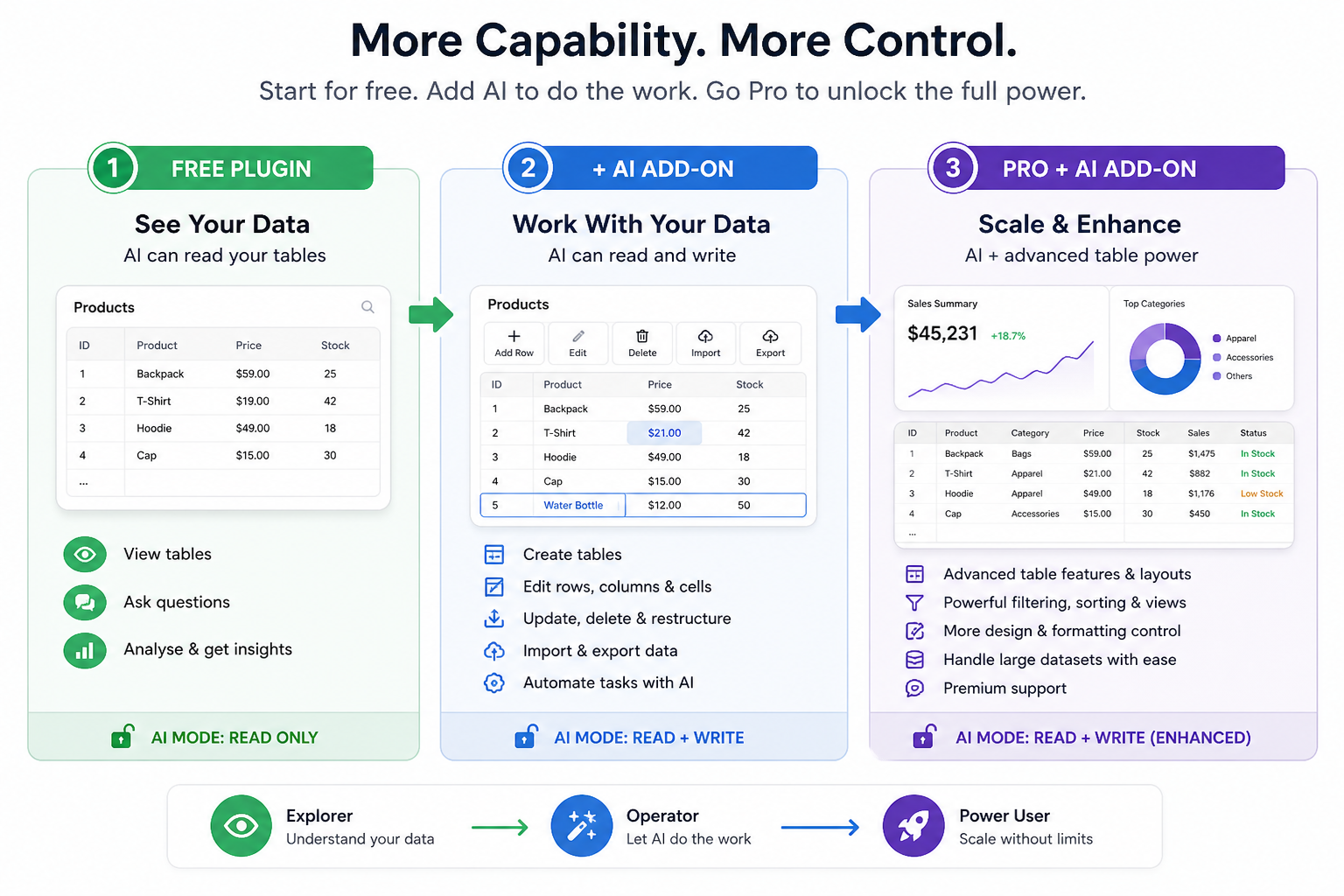
AI Add-On · For business users and developers
Create, edit, and manage your Data Tables

in seconds — with AI.

Stop editing tables by hand. Describe the change — AI handles the rest.

Bulk pricing. Calculated columns. Imports. Cleanup.

Works with your existing Data Tables (Free or Pro).

MCP protocol
Priority support
Updates included
30-day money-back

Stop editing rows. Start describing changes.

Same tables. Same site. A lot less of your time.

Before

You do every change by hand.

  • Open the row. Edit it. Save it.
  • Repeat for every cell that needs to change.
  • Fix the formatting that broke along the way.
  • Repeat the same edits next week. And the week after.
With AI Add-On

You describe it. AI applies it.

  • Type the change you want.
  • AI applies it across the table.
  • Preview, accept, done.
  • Move on with your day.

What used to take you hours, now takes you minutes.

Real changes. Real prompts.

Examples of things people stop doing manually within a day of installing.

"Update prices across this table — increase by 10%."

Bulk price changes

No find-and-replace. No spreadsheet round-trip.

"Add a column with totals (price × quantity)."

Calculated columns

New columns in one line. No formulas to write.

"Show top 10 entries by revenue."

Filter and sort

Describe what you want to see. Useful for reports and dashboards.

"Fix formatting issues in the date column."

Clean up messy data

Standardise dates, currencies, casing — without scripts.

"Hide rows where stock is 0."

Conditional logic

Plain English filter rules, applied instantly to the live table.

"Import this CSV and merge with the existing table."

One-shot imports

Bring data in from spreadsheets or exports without the click-through dance.

Built for the people doing the work.

Whether you manage client sites — or run your own:

Developers

Less manual work. Fewer support requests.

  • Apply bulk changes across client tables in seconds
  • Cut "can you update this?" tickets out of your inbox
  • Use it on every table you've already set up
  • No reconfiguration — drop into your existing install
  • Predictable output you can hand back to clients
Business Users

Faster updates. Fewer mistakes.

  • Update prices, stock, or schedules without your developer
  • Type the change instead of editing every row
  • Avoid copy-paste errors and formatting breakage
  • Get changes live in minutes, not after the next standup
  • Nothing new to learn if you can write a sentence

What used to take you hours, now takes you minutes.

Three steps. No rebuild required.

Works with your existing tables — no rebuild required.

1
Install

Install the AI Add-On

Drop the Add-On into your Data Tables install — Free or Pro. No reconfig. No data migration.

2
Connect

Connect your AI Agent

Connect any AI agent that supports the MCP protocol — follow this guide to set it up. Takes about a minute. You only do it once.

3
Ask

Ask AI to work with your tables

Ask your AI agent to create, update, restructure, or import data into any table — in plain English.

Questions buyers ask most.

Five things to know before you click buy.

Do I need a separate AI subscription?

Yes. The AI Add-On lets MCP-compatible AI agents (Claude, Cursor, etc.) read and write your Data Tables. You'll need your own account with whichever AI tool you use — Claude's free tier works for many use cases.

What AI tools work with this?

Anything that speaks MCP — Claude (desktop and web), Cursor IDE, and any other MCP-compatible client. Connect once via the setup guide.

Will it work on tables I've already built?

Yes. Drop the Add-On into any Data Tables install — Free or Pro — without reconfiguration or migration. It works on every table you've already set up.

What if AI makes a mistake?

AI changes are previewed before they're applied. You see what's about to change and accept or reject before anything writes to your table. For larger operations, you can also export your table as a backup first.

Can I cancel?

Yes. 30-day money-back guarantee — if the AI Add-On doesn't earn its keep within your first month, contact support and we'll refund your purchase in full. No scripts, no hassle.

Stop building and updating tables by hand.
Don't waste another minute.

Add AI to the Data Tables you already use. Build, update, and manage — in plain English.

30-day money-back guarantee · Updates & support included
$30 · 1 site · 1 year · Works with Free or Pro Data Tables