A CRM keeps everything you know about your customers in one place: who they are, how they found you, what they read, what they bought and what to send them next. On a WordPress site it can live right inside your dashboard, next to the forms, popups and shop that bring the people in.
This guide compares the best WordPress CRM plugins in 2026, explains what to look for, and shows the CRM in CES — Popup Builder, Optin Forms, CRM & Email Marketing Automation in detail with demo data. Prices of other plugins are taken from their own websites in November 2026.
What to look for in a WordPress CRM
- Your data, your database. A self-hosted CRM stores contacts in your WordPress database, not on someone else’s servers, and you can export them any time.
- Capture built in. Contacts should arrive on their own from forms, popups, sign-ups and orders, with tags that say where they came from.
- Email in the same place. Newsletters and automated emails that go to tags and lists, with opens and clicks recorded on each contact.
- Revenue you can see. WooCommerce orders and the emails that led to them, on the contact and in reports.
- Segments. Lists that update themselves from tags and fields.
- A fair price. One price per site, not per contact.
Quick comparison
| Plugin | Free version | Where contacts are stored | Paid plans from (one site) |
|---|---|---|---|
| CES | Yes: CRM, popups, forms, newsletters, automations, reports | Your WordPress database | $99 per year |
| FluentCRM | Yes | Your WordPress database | $129 per year |
| Jetpack CRM | Yes | Your WordPress database | $11 per month, billed yearly |
| Groundhogg | Yes | Your WordPress database | $20 per month, billed annually ($240) |
| HubSpot | Yes, for up to 2 users | HubSpot’s cloud CRM | Starter, per seat |
1. CES: the all-in-one CRM for WordPress
CES puts popups, forms, a CRM, newsletters and automations into one free plugin, so every contact arrives with its history already attached: the popup they saw, the form they sent, the emails they opened and the orders they placed.
Contacts that arrive on their own
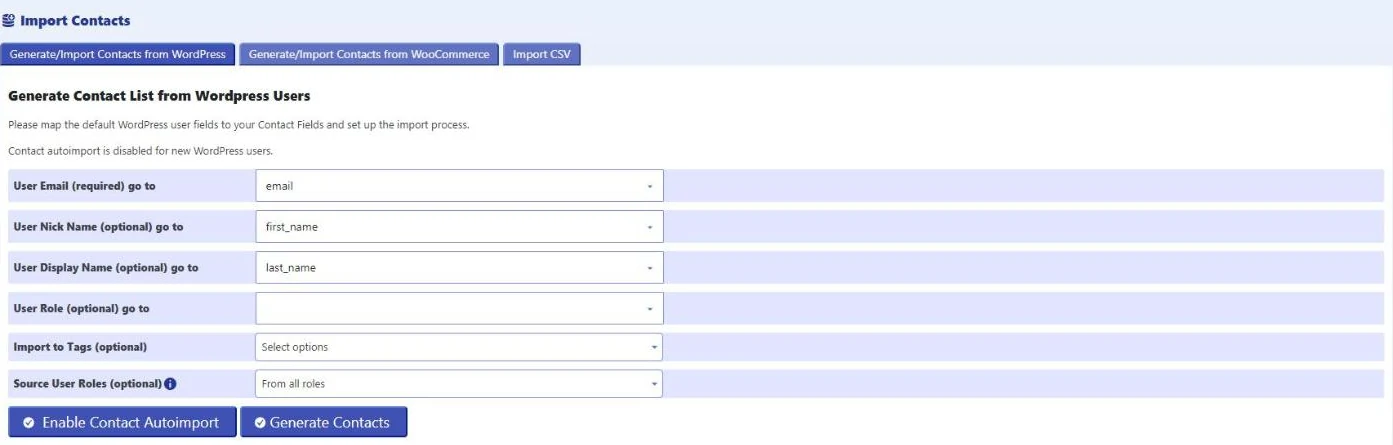
Every form and popup in CES saves the visitor as a contact and can add tags, for example weekly-recipes or trip-offer. You can also import contacts from WordPress users, WooCommerce customers or a CSV file, and switch on auto-import so new WordPress users become contacts by themselves.
A contact list that shows who is hot
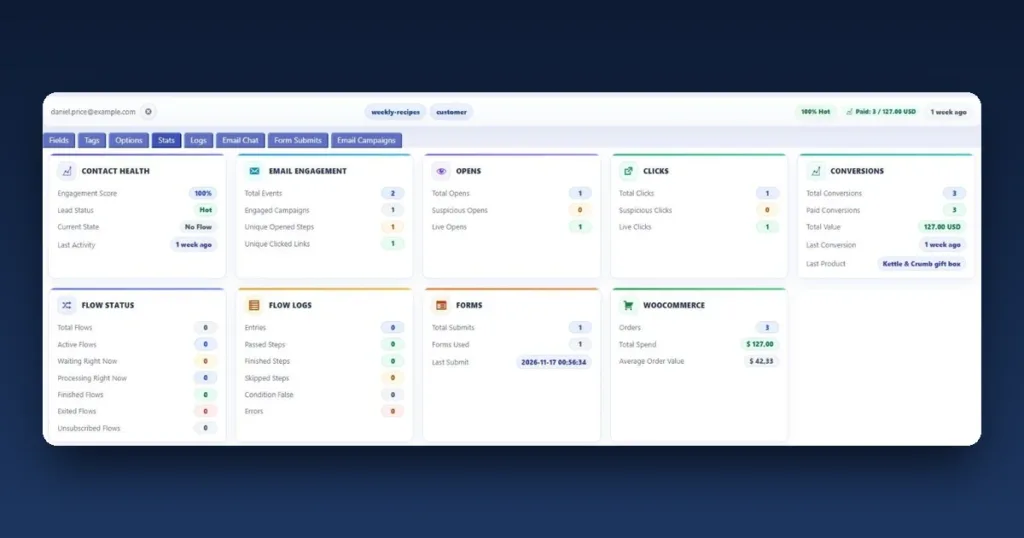
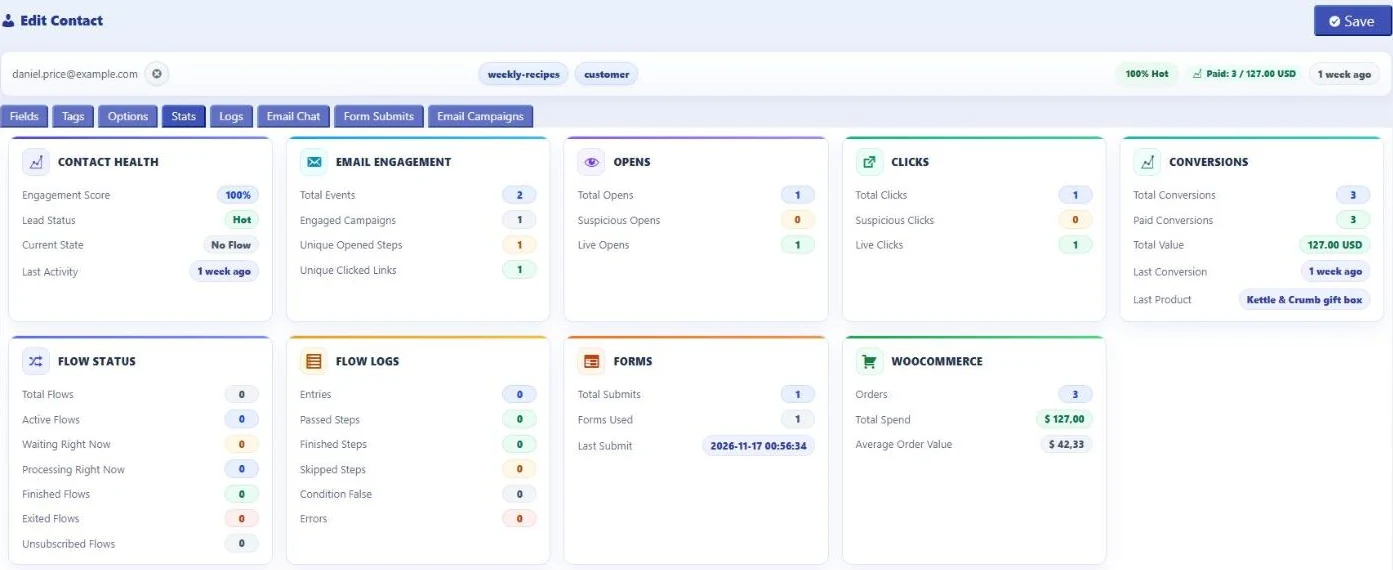
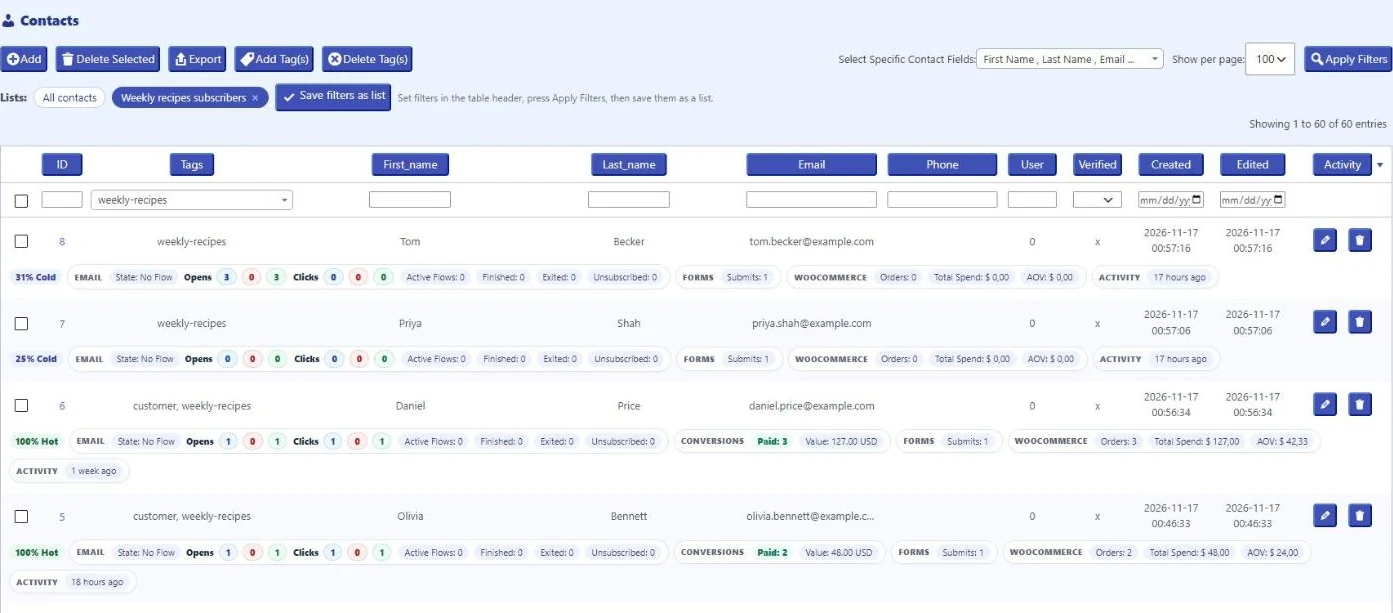
The Contacts screen shows each person with their tags and a live summary: an engagement score with a lead status (Hot, Warm or Cold), email opens and clicks, form submissions, paid conversions and WooCommerce orders, total spend and average order value. Saved lists such as “Weekly recipes subscribers” update themselves.
Opens and clicks you can trust
CES separates live opens and clicks from suspicious ones, such as those made by mail scanners and bots, so the engagement score reflects people, not robots.
Revenue tied to your emails
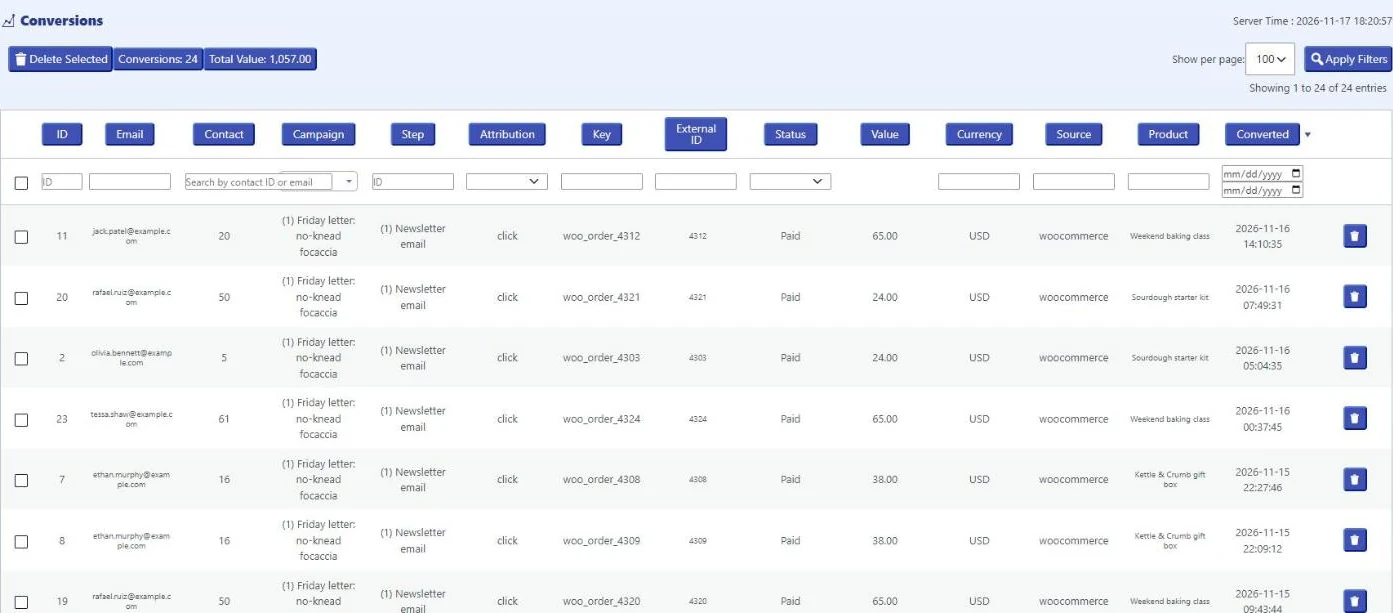
When someone clicks a link in a newsletter and then buys in your WooCommerce shop, CES records the order as a conversion of that email: the contact, the campaign, the product and the value. The Conversions report adds it all up.
Email and automation in the same plugin
Send newsletters to a tag or a saved list, and run automations such as a welcome series or a follow-up after a quote. Every open and click lands on the contact, so you see who is interested before you send the next email.
Free and Pro
Everything above is in the free version. CES Pro, from $99 per year for one site, adds email confirmation (double opt-in), advanced targeting, branching automations with unlimited steps, a tag for everyone who clicks a newsletter link, and direct connections to email providers. See the plans.
2. FluentCRM
FluentCRM is an email marketing CRM for WordPress. Its WordPress.org listing describes contacts with tags and lists, email campaigns, a visual automation builder and opt-in forms, and it stores data in the WordPress database. Paid plans start at $129 per year for one site on fluentcrm.com.
3. Groundhogg
Groundhogg is a CRM with newsletters and marketing automation, self-hosted in WordPress. Its free version is described as free forever on the vendor’s site, and paid plans start at $20 per month, billed annually at $240.
4. Jetpack CRM
Jetpack CRM focuses on client records: contacts, quotes, invoices, transactions and a client portal, stored in WordPress. Email campaigns and automations are offered as extensions. Paid plans start at $11 per month, billed yearly.
5. HubSpot for WordPress
The HubSpot plugin connects WordPress forms, popups and live chat to HubSpot’s cloud CRM. The free plan covers up to 2 users and, for marketing email, 2,000 sends per calendar month with HubSpot branding. Paid Starter plans are priced per seat.
How to choose
- You want popups, forms, a CRM and email in one plugin, with your data in WordPress: CES.
- You run a WooCommerce shop: pick a CRM that shows orders and email revenue on each contact. CES does both out of the box.
- You already work in HubSpot’s cloud: its plugin connects your site to it.
- You mainly need quotes and invoices for clients: a client-records CRM such as Jetpack CRM covers that.
Set up CES as your CRM in four steps
- Install CES from Plugins → Add New Plugin (search for “CES Supsystic”) or download it here.
- Import the contacts you have from WordPress users, WooCommerce or a CSV file, and give them a tag.
- Add a signup popup or form that tags new contacts. The guide How to build an email list in WordPress walks through it.
- Send your first newsletter to the tag, then watch opens, clicks and orders appear on each contact.
FAQ
What is a WordPress CRM?
A plugin that stores your contacts and their history inside WordPress: where they came from, what they opened and clicked, and what they bought, with tools to email and segment them.
Is there a free CRM for WordPress?
Yes. CES is free on WordPress.org and includes the CRM, popups, forms, newsletters, automations and reports.
Where are my contacts stored?
In CES, in your own WordPress database. Your contacts are not sent to Supsystic, and you can export them to CSV at any time.
Does the CRM work with WooCommerce?
Yes. CES imports WooCommerce customers and shows each contact’s orders, total spend and average order value, plus the orders that followed an email click.
Can I segment contacts?
Yes. Use tags and contact fields, filter the list, and save the filter as a list that updates itself. Newsletters can go to a tag or a saved list.
Can I add my own contact fields?
Yes. Add fields such as company or phone under Contacts → Contact fields and use them in forms and filters.
Try the CES CRM
CES is free on WordPress.org and is used on 10,000+ WordPress sites. Install it, import your contacts, and your CRM, popups and emails work together from day one.
Download CES free | See Pro plans | Explore the CES CRM
More: CES overview · Email marketing and automations · Popup builder · Exit-intent popups · All free plugins